
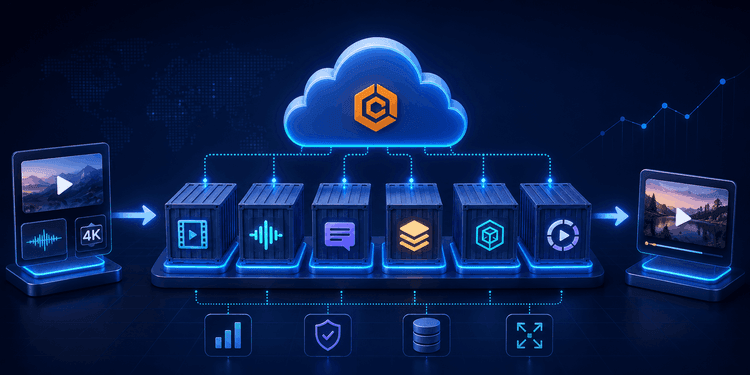
Efterhånden som vores videobehandlingsplatform voksede, steg kompleksiteten ved håndtering af beregningstunge arbejdsbyrder også. Opgaver som videonormalisering, lydudtrækning, transskription, generering af overlays og rendering kan forbruge betydelige CPU- og hukommelsesressourcer, især når flere projekter behandles samtidigt.
At køre disse arbejdsbyrder direkte i den primære applikationsinfrastruktur kan føre til ressourcekonkurrence, langsommere behandlingstider og begrænset skalerbarhed. Efterhånden som efterspørgslen steg, havde vi brug for en mere fleksibel og effektiv måde at styre behandlingsarbejdsbyrder på uden at påvirke ydeevnen af vores kerneapplikationstjenester.
For at imødegå disse udfordringer har vi taget AWS Elastic Container Service (ECS) i brug som vores containerorkestreringsplatform.
Vi kan effektivt styre baggrundsbehandlingsaktiviteter, skalere ressourcer efter behov og udføre behandlingsarbejdsbyrder i separate containere med AWS ECS. Dette gør det muligt for vores platform at håndtere varierende arbejdsbyrder, samtidig med at ydeevne, pålidelighed og operationel effektivitet opretholdes.
I denne blog vil vi udforske, hvad AWS ECS er, hvorfor vi valgte det, og hvordan det hjælper os med at skalere vores videobehandlingsinfrastruktur.
Udfordringen ved at skalere videobehandling
Videobehandlingsarbejdsbyrder er i sagens natur ressourcekrævende og meget variable.
Et enkelt projekt kan omfatte:
- Videonormalisering
- Lydudtrækning
- Tale-til-tekst transskription
- Generering af overlays
- Rendering af flere outputvariationer
- Behandling af medieaktiver i høj opløsning
Efterhånden som antallet af projekter stiger, kan infrastrukturkravene vokse hurtigt.
Vi havde brug for en løsning, der kunne:
- Skalere behandlingsressourcer efter behov
- Håndtere flere opgaver på én gang
- Isolere ressourcekrævende opgaver fra brugerrettede tjenester
- Forbedre pålideligheden under spidsbelastning
- Optimere infrastrukturudnyttelsen
- Reducere den operationelle byrde
Traditionelle tilgange, der udelukkende er afhængige af langtkørende servere, kan blive ineffektive, efterhånden som arbejdsbyrderne vokser. Vi ønskede et system, der dynamisk kunne tildele ressourcer baseret på det faktiske behov.
Hvad er AWS ECS?
AWS Elastic Container Service (ECS) er en fuldt administreret containerorkestreringstjeneste, der gør det muligt for organisationer at køre og administrere containeriserede applikationer i stor skala.
ECS hjælper med at automatisere:
- Containerimplementering
- Opgaveplanlægning
- Ressourcetildeling
- Tjenesteadministration
- Skalering af arbejdsbyrder
- Sundhedsovervågning
I stedet for manuelt at administrere servere og applikationsprocesser tilbyder ECS en centraliseret platform til effektiv kørsel af containeriserede arbejdsbyrder.
Hvorfor vi valgte AWS ECS
Skalerbarhed efter behov
En af de største fordele ved ECS er dens evne til at skalere arbejdsbyrder baseret på behov.
Kravene til videobehandling kan svinge betydeligt i løbet af dagen. Nogle perioder kan kun involvere få behandlingsopgaver, mens andre kan kræve håndtering af store mængder rendering og mediebehandlingsopgaver samtidigt.
ECS giver os mulighed for dynamisk at starte yderligere behandlingsopgaver, når efterspørgslen stiger, og skalere ned, når arbejdsbyrderne falder.
Denne fleksibilitet hjælper os med at opretholde ydeevnen uden permanent at tildele unødvendige ressourcer.
Arbejdsbyrdeisolering
Opgaver, der involverer videobehandling, kræver ofte en stor mængde CPU og hukommelse.
Ved at køre arbejdsbyrder i separate containere muliggør ECS, at vi kan isolere behandlingsoperationer fra vores kerneapplikationstjenester.
Denne adskillelse hjælper med at:
- Øge systemets stabilitet
- Undgå ressourcekonkurrence
- Forenkle fejlfinding
- Øge fejltolerancen
Hvis en behandlingsopgave støder på et problem, påvirker det ikke direkte resten af platformen.
Effektiv ressourceudnyttelse
Ikke alle behandlingsarbejdsbyrder kræver den samme mængde computerkraft.
Nogle operationer er letvægts, mens andre involverer intensiv rendering og mediebehandling.
ECS giver os mulighed for at tildele ressourcer baseret på arbejdsbyrdens krav, hvilket sikrer, at infrastrukturressourcer udnyttes effektivt og virkningsfuldt.
Dette hjælper med at optimere både ydeevne og driftsomkostninger.
Reduceret operationel kompleksitet
Manuelt at administrere et stort antal behandlingsservices kan hurtigt blive vanskeligt.
ECS forenkler infrastrukturadministrationen ved at håndtere:
- Containerplanlægning
- Opgaveudførelse
- Sundhedstjek
- Ressourceadministration
- Tjenestegendannelse
Dette frigør vores tekniske personale til at koncentrere sig om platformforbedring i stedet for infrastrukturvedligeholdelse.
Problemfri AWS-integration
ECS integrerer naturligt med andre AWS-tjenester, der er en del af vores infrastruktur.
Dette muliggør strømlinet implementering, overvågning, sikkerhed og operationelle arbejdsgange, samtidig med at en konsekvent cloud-native arkitektur opretholdes.
Hvordan vi bruger AWS ECS
AWS ECS spiller en kritisk rolle i vores videobehandlingspipeline.
I stedet for at køre alle behandlingsoperationer direkte på vores primære applikationsservere, udfører vi ressourcekrævende arbejdsbyrder gennem containeriserede behandlingsopgaver, der administreres af ECS.
Videonormalisering
Uploadede videoer kræver ofte forberedelse, før de kan indgå i downstream-arbejdsgange.
ECS hjælper os med at behandle disse normaliseringsopgaver uafhængigt, hvilket sikrer ensartede inputformater for efterfølgende operationer.
Lydudtrækning og transskription
Lydudtrækning og transskription kan være beregningstungt, især når flere videoer behandles samtidigt.
Ved at køre disse opgaver inden for ECS kan vi skalere behandlingskapaciteten, efterhånden som efterspørgslen vokser.
Rendering af arbejdsbyrder
Videorendering er en af de mest ressourcekrævende faser i vores arbejdsgang.
Ved at udnytte ECS kan vi udføre renderingjobs uafhængigt og tildele ressourcer specifikt til renderingopgaver.
Dette hjælper med at opretholde en ensartet ydeevne selv i perioder med stor efterspørgsel.
Baggrundsbehandling
Mange operationer sker asynkront bag kulisserne.
Eksempler omfatter:
- Medieforberedelse
- Behandling af aktiver
- Udførelse af arbejdsgange
- Efterbehandlingsoperationer
ECS giver et pålideligt miljø til at køre disse baggrundsarbejdsbyrder i stor skala.
Vores containeriserede behandlingsarbejdsgang
En forenklet version af vores behandlingsarbejdsgang ser således ud:
Trin 1: Projektindsendelse
En bruger indsender et projekt, der indeholder videoaktiver og behandlingskrav.
Trin 2: Opgaveoprettelse
Platformen identificerer de nødvendige behandlingsoperationer og genererer de passende arbejdsbyrder.
Trin 3: Udførelse af ECS-opgave
ECS starter containeriserede behandlingsopgaver med de ressourcer, der kræves til hver operation.
Trin 4: Behandling og rendering
Opgaver udfører normalisering, transskription, rendering og andre behandlingsaktiviteter.
Trin 5: Afslutning og levering
Når behandlingen er afsluttet, lagres outputtet og gøres tilgængeligt for brugerne.
Denne arbejdsgang giver os mulighed for effektivt at behandle arbejdsbyrder, samtidig med at skalerbarhed og pålidelighed opretholdes.
Fordele for vores brugere
De infrastrukturmæssige beslutninger, vi træffer, har direkte indflydelse på brugeroplevelsen.
Ved at udnytte AWS ECS kan vi levere:
Hurtigere behandling
Dynamisk ressourcetildeling hjælper med at reducere behandlings- og renderingstider.
Forbedret skalerbarhed
Platformen kan håndtere stigende efterspørgsel uden væsentlige arkitektoniske ændringer.
Ensartet ydeevne
Arbejdsbyrdeisolering hjælper med at opretholde platformens reaktionsevne selv under spidsbelastning.
Forbedret pålidelighed
Containeriserede arbejdsbyrder forbedrer fejltolerancen og reducerer virkningen af behandlingsfejl.
Bedre ressourceeffektivitet
Ressourcer tildeles baseret på arbejdsbyrdens krav, hvilket hjælper med at optimere ydeevne og omkostninger.
Fremadrettet
Efterhånden som vores platform fortsætter med at udvikle sig, vil behandlingskravene fortsætte med at vokse. Understøttelse af større projekter, yderligere arbejdsgange og stigende brugeraktivitet kræver en infrastruktur, der kan skalere effektivt.
AWS ECS giver den fleksibilitet og de orkestreringsmuligheder, der er nødvendige for at understøtte disse udviklende krav. Ved fortsat at udnytte containeriserede behandlingsarbejdsbyrder kan vi tilpasse os skiftende krav, samtidig med at ydeevne, pålidelighed og operationel effektivitet opretholdes.
Konklusion
Skalering af videobehandlingsarbejdsbyrder kræver en infrastruktur, der effektivt kan håndtere ressourcekrævende operationer, samtidig med at den forbliver fleksibel og pålidelig.
AWS ECS gør det muligt for os at køre og administrere containeriserede arbejdsbyrder i stor skala, hvilket giver den orkestrering, skalerbarhed og arbejdsbyrdeisolering, der er nødvendig for at understøtte moderne videobehandlingspipelines.
Ved at udnytte ECS som en central del af vores arkitektur kan vi behandle arbejdsbyrder mere effektivt, forbedre systemets pålidelighed og fortsætte med at levere en højtydende oplevelse for vores brugere, efterhånden som vores platform vokser.