
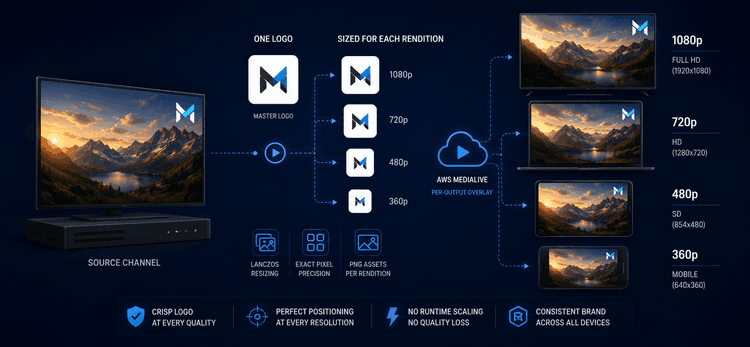
Das Logo eines FAST-Kanals – die kleine Markierung in der Ecke – ist die einzige visuelle Konstante in jedem Programm, jeder Werbepause, jeder Sendeeinblendung, die der Kanal ausstrahlt. Es muss auf jeder Qualitätsstufe, die ein Zuschauer empfangen könnte, professionell aussehen. Der naive Ansatz – ein Master-Bild hochladen und es von AWS MediaLive pro Rendition skalieren lassen – erzeugt ein scharfes Logo bei 1080p und ein sichtbar weiches bei 360p. Das ist ein Markenproblem für jeden Zuschauer, der keine Breitbandverbindung hat. Hier erfahren Sie, wie wir das Logo stattdessen an das exakte Pixelraster jeder Rendition angepasst haben.
Kurzübersicht
| Aspekt | Detail |
|---|---|
| Bereich | Kanal-Logo (DOG) Overlay auf FAST-Kanälen |
| Mechanismus | Per-Output StaticImageOutputActivate pro Rendition (1080p, 720p, 480p, 360p) |
| Asset-Generierung | Python-Skript mit Lanczos Resampling |
| Aktivierungszeitpunkt | 1,5s nach jedem Input-Switch des Programms |
| Status | 1× Per-Rendition-Stack in Produktion |
Das Geschäftsproblem
Ein FAST-Kanal liefert nicht nur eine Qualitätsstufe. MediaLive kodiert denselben Kanal in mehrere Renditionen – 1080p, 720p, 480p, 360p – und der Player jedes Zuschauers wählt die beste, die seine Verbindung aufrechterhalten kann. Mobile Zuschauer mit Mobilfunkdaten sehen 360p; Smart-TV-Zuschauer mit Breitbandverbindung erhalten 1080p. Sie alle sehen dieselbe Markenmarkierung und erwarten, dass sie professionell aussieht. Wenn das Logo bei 1080p scharf und bei 360p sichtbar weich ist, ist die Marke inkonsistent – kein unwesentliches Detail auf einem 24/7-Kanal, wo das Logo das einzige Element ist, das die Zuschauer häufiger sehen als jedes einzelne Programm.
Wo Overlays tatsächlich angewendet werden
In einer Encoder-Pipeline mit mehreren Renditionen kann ein Overlay an zwei Stellen angewendet werden:
Vor dem Per-Rendition-Scaler, wo ein Master-Bild auf die Quelle gelegt und das Ganze pro Output herunterskaliert wird – dies ist das, was MediaLive mit einer globalen StaticImageActivate-Aktion tut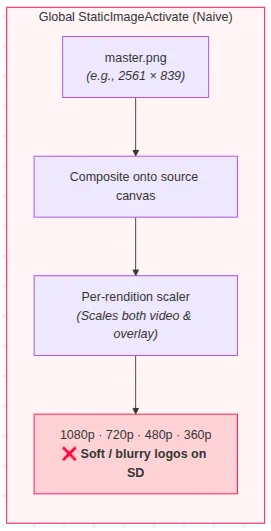
nach dem Scaler, wo jeder Output sein eigenes Overlay erhält, sobald die Arbeitsfläche bereits die endgültige Größe hat. Der Unterschied scheint in der API gering zu sein. Visuell ist er es nicht. Alles, was vor dem Scaler zusammengesetzt wird, erbt jedes Artefakt, das der Scaler einführt, und bei 360p ist der Scaler aggressiv.
Warum die offensichtlichen Lösungen fehlschlagen
"Einen Master hochladen und MediaLive skalieren lassen." Die globale Aktion setzt den Master zusammen, bevor der Per-Output-Scaler läuft. Ein großer Master, der auf ein 64×21px-Logo für 360p herunterskaliert wird, ist eine ungefähr 40-fache Reduzierung – selbst Lanczos Resampling verliert bei diesem Verhältnis feine Details, und das Ergebnis durchläuft dann dieselbe Kompressionskette wie das Video selbst.
"Einen größeren Master verwenden." Dies macht das Downscale-Verhältnis größer, nicht kleiner – das Artefakt wird schlechter, nicht besser.
"Das Logo bei SD-Outputs überspringen." Compliance- und Markenanforderungen verlangen die Markierung auf jeder Rendition. Keine Option.
"Das Logo zur Kodierzeit in das Quellvideo einbrennen." Verliert jede operationale Hebelwirkung – keine Logo-Änderungen pro Kampagne oder Region und keine Aktualisierung ohne Neukodierung der gesamten Bibliothek.
"Ein globales Overlay mit manuellen Koordinaten pro Auflösung verwenden." Die globale Aktion berechnet die Position anhand einer festen 1920×1080-Referenz, sodass Quellvideos, die schmaler sind, Off-Canvas-Koordinaten erzeugen – das Logo verschiebt sich aus der Ecke oder wird beschnitten.
Der eigentliche Hebel war, die Overlay-Skalierung von MediaLive vollständig zu umgehen: das Logo selbst an die Arbeitsfläche jeder Rendition anzupassen, bevor der Encoder es überhaupt berührt.
Die Lösung
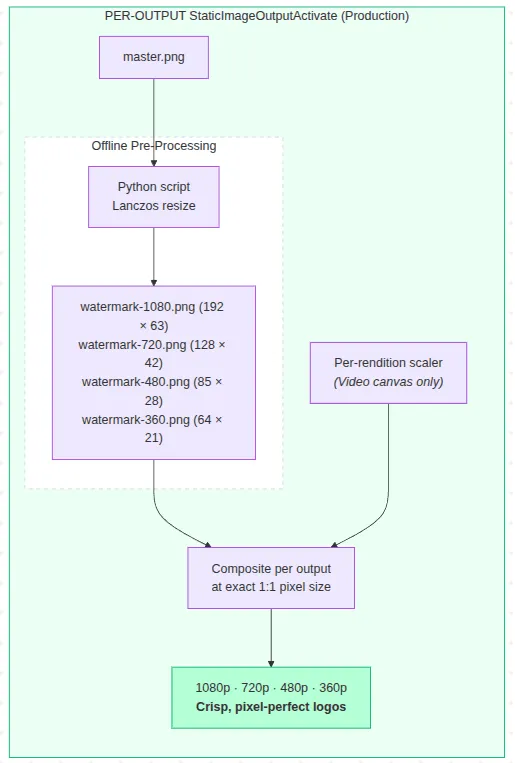
Das Logo jeder Rendition wird auf seine exakten Pixelmaße vorgerendert und als separate PNG-Datei gespeichert. An jeder Programmgrenze sendet ein Lambda-Orchestrator vier StaticImageOutputActivate-Aktionen – eine pro Rendition – die jeweils auf die bereits für diesen spezifischen Output dimensionierte PNG-Datei verweisen. MediaLive führt keine Skalierung des Overlays durch.
GLOBAL (naiv)                     PRO-OUTPUT (was wir ausliefern)
master.png ──► auf Quellarbeitsfläche     master.png ──► Lanczos Resize (offline)
               zusammensetzen                            in 4 exakt dimensionierte PNGs
                    │                                  │
                    ▼                                  ▼
           Per-Rendition-Scaler              Per-Rendition-Scaler
           (skaliert auch das                (Overlay wird nicht berührt —
            Overlay → weiches Logo            danach, in exakter Pixelgröße,
            auf SD-Outputs)                   zusammengesetzt)
Ein Python-Skript generiert die vier dimensionierten PNGs aus einem einzigen Master unter Verwendung von Lanczos Resampling, das für sein vorhersehbares, reproduzierbares Verhalten bei kleinen Größen gewählt wurde, anstatt einen Pixel-Qualitätswettbewerb zu gewinnen. Jedes Logo nimmt etwa 10 % der Breite seiner Arbeitsfläche ein – sichtbar, ohne aufdringlich zu sein – und das Hinzufügen einer neuen Rendition ist ein einziger Array-Eintrag plus eine neue PNG-Datei.
Wichtige Entscheidungen
Aktivierungsverzögerung von 1,5 Sekunden. Watermark-On-Aktionen werden 1,5 Sekunden nach jedem Input-Switch ausgelöst, nicht genau im Moment des Switches – eine sofortige Aktivierung kann bei noch nicht stabilen Frames flimmern. Der Wert wurde empirisch abgestimmt und als einzige Konstante zentralisiert, sodass zukünftige Anpassungen eine Ein-Zeilen-Änderung sind.
Offline, menschengesteuerte Asset-Generierung – bewusst. Die Lanczos Resize-Pipeline ist nicht als Build-Schritt oder CDN-seitige Transformation automatisiert. Logo-Assets ändern sich selten genug, dass eine Regeneration mit einem Befehl das richtige Maß an Automatisierung darstellt; die Kosten für den Aufbau weiterer Automatisierung überwiegen das Ausführen eines Skripts zweimal im Jahr.
Eine "dicke" Variante existiert, wird aber nicht ausgeliefert. Der Generator erzeugt auch eine Dilated-Alpha-Variante mit dickeren Strichen, die dazu gedacht ist, die H.264-Quantisierung bei niedrigen SD-Bitraten zu überstehen. Sie ist nicht in Produktion – die Standardvariante ist für den aktuellen Bitratenbereich ausreichend, und noch keine Messung rechtfertigt einen Wechsel. Sie existiert als codegestützter Standby: günstig bereitzuhalten, verfrüht auszuliefern.
Was wir noch beobachten
Keine Video-Produktionspipeline ist jemals wirklich fertig, und es gibt immer noch Möglichkeiten, diesen Ansatz im Laufe der Zeit zu verfeinern.
Die aktuelle Implementierung stellt sicher, dass jede Rendition ein speziell für ihre eigene Output-Auflösung vorbereitetes Logo erhält, wodurch die Runtime-Overlay-Skalierung aus der MediaLive-Pipeline entfällt. Das endgültige Erscheinungsbild ist jedoch immer noch natürlich durch die Auflösung jeder Rendition und die Videokomprimierung begrenzt, insbesondere bei niedrigeren Bitraten. Während sich Streaming-Profile weiterentwickeln, werden wir weiterhin prüfen, ob unterschiedliche Logo-Behandlungen unter diesen Bedingungen messbare visuelle Vorteile bieten.
Der Asset-Generator unterstützt bereits sowohl die Standard- als auch eine dickere Logo-Variante. Wenn zukünftige Tests zeigen, dass die dickere Version für Renditionen mit niedrigerer Bitrate besser abschneidet, werden wir die Auswahl der Logo-Variante konfigurationsgesteuert gestalten, sodass sie ohne Neuimplementierung der Anwendung geändert werden kann.
Ergebnisse
Jede Rendition erhält nun ein speziell für ihre eigene Arbeitsfläche dimensioniertes Logo, wobei MediaLive keinerlei Laufzeit-Overlay-Skalierung durchführt. Jeder Output verwendet für seine Zielauflösung vorbereitete Grafiken, wodurch die zusätzliche Weichzeichnung durch Laufzeit-Overlay-Skalierung vermieden und gleichzeitig die bestmögliche praktische visuelle Qualität, die die Rendition liefern kann, erhalten bleibt.
Der Koordinaten-Drift-Bug aus dem vorherigen globalen Overlay-Ansatz, bei dem Logos auf Quellvideos, die schmaler als 1920px waren, verschoben werden konnten, ist strukturell eliminiert, da die Per-Output-Aktivierung vollständig in Output-Koordinaten arbeitet.
Das Ersetzen des Logos ist jetzt eine einfache operationale Aufgabe: die renditionspezifischen Assets mit einem einzigen Skript neu generieren und hochladen. Es ist keine Neu-Kodierung des Videos und keine manuelle Bearbeitung pro Rendition erforderlich.
Diese Implementierung folgt einem einfachen technischen Prinzip: Probleme so früh wie möglich in der Pipeline lösen und um die Fähigkeiten der Plattform herum entwickeln, anstatt sich auf nachgelagerte Workarounds zu verlassen. Durch die Vorbereitung des korrekten Assets vor der Kodierung bleibt die Live-Pipeline einfacher, vorhersehbarer und leichter zu warten.
Wenn Sie auf ähnliche Renditions- oder Overlay-Qualitätsprobleme in einer Live-Video-Pipeline stoßen, kontaktieren Sie uns.
Technologie-Stack: AWS MediaLive · AWS Lambda · AWS S3 · NestJS · TypeScript · Python (Pillow)