
Why Your Video Preview Lies About Export
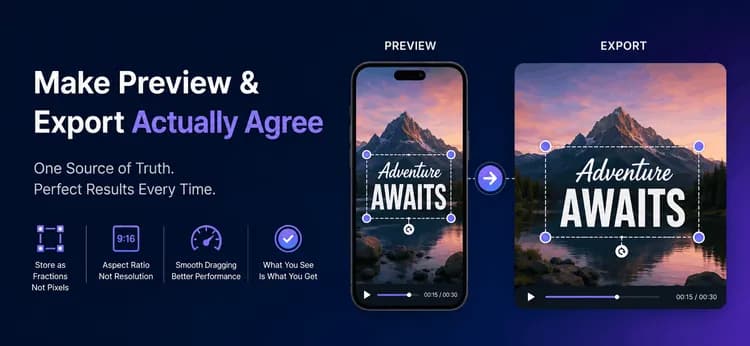
Your video editor looks finished. The preview is crisp, the caption sits exactly where the user dragged it, and the timeline scrubs smoothly. Then the user presses Export, and the caption comes back in the wrong place, at the wrong size, sometimes clipped off the edge entirely. Nothing crashed, there's no error in the log — the preview and the file simply disagree.
This is the single most common bug in every video editor, and it is a data modeling problem rather than a rendering one. Below is the one habit that makes the bug impossible, how to size frames correctly from an aspect ratio, and how to keep dragging fast on cheap phones. The ideas apply in any language or UI framework.
Aspect Ratio Is a Shape, Resolution Is a Size
Most frame bugs start here. An aspect ratio describes the shape of the frame and nothing else: 9:16 is tall, 16:9 is wide. A resolution describes the size in pixels, like 1080x1920. One shape supports many sizes, so the two values are never interchangeable.
| Aspect ratio | Numeric value | Typical use |
| 16:9 | 1.78 | YouTube, landscape web |
| 9:16 | 0.56 | Reels, TikTok, Shorts |
| 1:1 | 1.00 | Square feed posts |
| 4:5 | 0.80 | Portrait feed posts |
Store the ratio as plain text and convert it to a number only when you do math. Store a target height for the export, then derive the width from the ratio, and force both numbers to be even before they reach an encoder. Odd dimensions are the quiet cause of a surprising number of failed exports.
height = width / ratioToNumber(ratio) // sizing the preview box
function widthFromHeight(ratio, height): raw = height * ratioToNumber(ratio) return makeEven(round(raw)) // encoders require even sides
// 9:16 at 1080 tall -> 608 x 1080// 16:9 at 1080 tall -> 1920 x 1080
Store Positions as Fractions, Never Pixels
An editor lives in three worlds at three different sizes: the saved document, the on-screen preview, and the exported file. The document is the only source of truth — the other two are just renderings of it at a different scale.
Project -> Clip (source, trim, filters) -> Overlay (text / sticker)
Document Preview renderer Export renderer x = 0.5, y = 0.9 --> x * 360 px --> x * 1080 px --> MP4 | ^ ^ +------------------------+------------------------+ one stored fraction, one formula, two sizes
If you store 540 pixels, that number is only correct on the device it was measured on. If you store 0.5, it means "the horizontal centre" at every size forever. Every position, offset and scale in the model should be a fraction between 0 and 1.
type Overlay { x: number // 0.0-1.0 across (0.5 = centre) y: number // 0.0-1.0 down (0.9 = near bottom) scale: number // 1.0 = normal size rotation: number // degrees startTimeMs: number // when it appears endTimeMs: number // when it disappears}
Export then becomes almost boring, which is the point. The renderer uses the same formula as the preview with a larger multiplier: px = overlay.x * exportWidth. FFmpeg handles the frame itself, and its centring expression (ow-iw)/2 is the same arithmetic the preview uses to letterbox. Because the stored value never changed, the caption lands in exactly the right spot.
ffmpeg -i input.mp4 \ -vf "scale=1080:1920:force_original_aspect_ratio=decrease,\ pad=1080:1920:(ow-iw)/2:(oh-ih)/2:0xD3D3D3" \ -c:v libx264 -crf 23 -pix_fmt yuv420p -c:a aac output.mp4
Draw the Preview in a Single Pass
Measure the preview box at runtime instead of hard-coding it, since a phone, a tablet, and a resized desktop window all give you a different size. Draw every overlay in one canvas pass rather than mounting each one as a separate UI element — a single pass stays smooth while a finger is moving.
Two rules keep the loop honest. Skip any overlay outside its time range, and always pair save() with restore() so one item cannot leak its transform into the next.
function drawPreview(canvas, overlays, currentTime, box): for each overlay in overlays: if currentTime < overlay.startTimeMs: skip if currentTime > overlay.endTimeMs: skip
px = overlay.x * box.width // the key formula py = overlay.y * box.height
canvas.save() canvas.move(px, py) canvas.rotate(overlay.rotation) canvas.resize(overlay.scale) canvas.drawText(overlay.content) canvas.restore() // never optional
Keep Dragging Smooth with Two-Tier State
A dragging finger reports roughly sixty positions per second. If each one writes to your project store, you pay for validation, persistence and a full state rebuild sixty times a second, and the drag visibly stutters. Split the work into two tiers instead:
- Tier 1, ephemeral: a small
liveDragmap holding where the finger is right now. Update it on every move and repaint the canvas. Nothing else runs. - Tier 2, durable: on drag end, commit the final fraction to the overlay in the project model, clear the
liveDragentry, and record one undo step.
The payoff goes beyond frame rate. Undo history stays useful because a drag produces one entry rather than hundreds, and autosave stops thrashing the disk. This is how Figma and Canva keep direct manipulation responsive.
Real-World Context
At MicrocosmWorks, we picked up a short-form editor whose captions drifted on export. The team had persisted overlay positions as device pixels read straight off the preview canvas, so a caption authored on a small phone landed high and small in the 1080p file, and switching aspect ratio pushed some overlays off the frame entirely.
We migrated the model to normalized 0-to-1 coordinates, made both renderers share a single fraction-times-size helper, and enforced even output dimensions derived from the stored ratio. Preview and export matched on every test device. Moving drag commits to drag-end removed the lag users had reported on lower-end Android hardware. You can see the kind of short-form video and editing work this came out of in our project portfolio.
Conclusion
A preview and an export are two renderings of one document, so give them one source of truth. Store positions as fractions, use the same fraction-times-size formula in both renderers, derive width from the aspect ratio, keep dimensions even, and commit drag changes only when the finger lifts. Those five habits remove an entire category of bug before it is written.
Building media engines where the interactive view and the final file agree is a core focus of our video and streaming engineering work at MicrocosmWorks.
Shipping a video or content editor and want preview and export to actually agree? We've solved this exact class of bug in short-form editing tools. Talk to our engineering team →
Read more from our team
1. Optimizing Channel Logo for Different Video Resolutions
2. Snap a Plate, Log a Meal: A Computer-Vision Nutrition Pipeline