
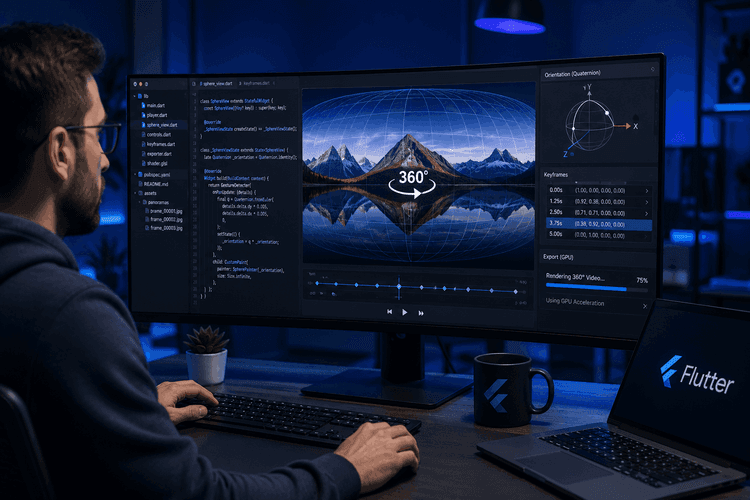
Reframing 360° Video in Flutter: Spherical Projection, Quaternion Keyframes, and GPU Export
How we turned raw equirectangular 360° footage into smooth, framed, flat video — entirely inside a Flutter app.
The problem nobody warns you about
A normal video has one obvious thing to show you: the frame the camera pointed at. A 360° video has no such thing. The camera recorded everything — a full sphere of pixels stored as a flat equirectangular rectangle (a 2:1 image where the X axis is longitude and the Y axis is latitude). Before you can put that footage on Instagram, YouTube, or a phone screen, somebody has to answer a question the camera deliberately refused to answer:
Where should the viewer look, and when?
"Reframing" is the act of flying a virtual camera through that sphere over time — panning, tilting, zooming — and rendering out a normal flat 16:9 (or 9:16, or 2.35:1) video. This is the feature that GoPro Player, Insta360 Studio, and Adobe Premiere's GoPro VR Reframe plugin are built around.
We built it entirely in Flutter. This post is a tour of the parts that were genuinely hard: the projection math, gimbal-lock-free interpolation, the ±180° seam, and a GPU export pipeline that has to survive real Android decoders.
The end-to-end flow:
capture/import 360 video
→ transcode a lightweight preview proxy
→ user taps / draws / auto-detects a subject
→ object tracking produces a path
→ generate + smooth keyframes
→ SLERP-interpolate per-frame camera orientation (live preview)
→ native GPU export to a flat video
→ FFmpeg post-pass (moov atom + A/V sync fix)
Architecture at a glance
We kept the system in three clean layers so the math is testable in isolation from Flutter:
| Layer | Lives in | Responsibility |
|---|---|---|
| Models | lib/data/models/reframe/ | SphericalCoordinates/Quaternion, CameraOrientation/MotionConstraints, ReframeKeyframe, ReframeProject |
| Services | lib/services/reframe/ | SphericalProjection (ray casting), CoordinateConverter, KeyframeInterpolator/Generator/Smoother, ReframeExportService |
| Presentation | lib/presentation/.../reframe/ | Riverpod ReframeNotifier, the native OpenGL Spherical360Player, bbox-drawing overlay, keyframe timeline |
The golden rule: all the trigonometry is pure Dart with no Flutter imports. That means every projection and interpolation function is unit-testable without a widget tree, and the same math drives both the live preview and the export.
1. The heart of it: equirectangular ⟷ spherical
Everything starts with one mapping. An equirectangular frame is just a rectangle where:
- X (0 → width) sweeps longitude (yaw) from −180° to +180°
- Y (0 → height) sweeps latitude (pitch) from +90° (top/zenith) to −90° (bottom/nadir)
SphericalCoordinates is deliberately tiny — just yaw and pitch. Roll, FOV, and zoom belong to the camera, not the direction. Here's the conversion that the whole feature rests on:
factory SphericalCoordinates.fromEquirectangular({
required double x, required double y,
required double videoWidth, required double videoHeight,
}) {
final normalizedX = x / videoWidth;
final normalizedY = y / videoHeight;
// X maps to yaw: 0->-180°, 0.5->0°, 1.0->180°
final yaw = (normalizedX - 0.5) * 360.0;
// Y maps to pitch: 0->90° (top), 0.5->0° (horizon), 1.0->-90° (bottom)
final pitch = (0.5 - normalizedY) * 180.0;
return SphericalCoordinates(
yaw: yaw.clamp(-180.0, 180.0),
pitch: pitch.clamp(-90.0, 90.0),
);
}
The inverse is the mirror image (normalizedX = yaw/360 + 0.5), and we use it constantly to draw a tracked bounding box back onto the player.
"Tap on what you see" — perspective ray casting
The user doesn't interact with the equirectangular rectangle. They interact with a rendered perspective view. So when they tap a point on the player, we need to cast a ray through a virtual pinhole camera and find which direction on the sphere they hit. That's SphericalProjection.screenToSpherical:
final ndcX = (2.0 * screenPoint.dx / playerSize.width) - 1.0;
final ndcY = 1.0 - (2.0 * screenPoint.dy / playerSize.height);
final aspectRatio = playerSize.width / playerSize.height;
final tanHalfFov = math.tan(cameraFov * math.pi / 360.0); // half-angle
double rayX = ndcX * aspectRatio * tanHalfFov;
double rayY = ndcY * tanHalfFov;
double rayZ = 1.0;
// ...normalize, rotate the ray by pitch (around X) then yaw (around Y)...
final sphericalYaw = math.atan2(finalRayX, finalRayZ) * 180.0 / math.pi;
final sphericalPitch = math.asin(finalRayY.clamp(-1.0, 1.0)) * 180.0 / math.pi;
The .clamp(-1.0, 1.0) before asin looks paranoid, but floating-point drift will hand you 1.0000001 and asin will return NaN — and a single NaN poisons every downstream frame. Defensive clamping around inverse trig is a recurring theme in this codebase.
2. Smooth camera motion: quaternions, not Euler angles
The naïve approach is to store yaw/pitch at each keyframe and linearly interpolate the numbers. It looks terrible. Interpolating Euler angles gives you gimbal lock, non-uniform angular velocity, and ugly snaps near the poles.
We interpolate orientation as a quaternion using SLERP (spherical linear interpolation). Each direction converts to a quaternion via a ZYX Euler convention:
Quaternion toQuaternion() {
final yawRad = yaw * math.pi / 180.0;
final pitchRad = pitch * math.pi / 180.0;
final cy = math.cos(yawRad * 0.5); final sy = math.sin(yawRad * 0.5);
final cp = math.cos(pitchRad * 0.5); final sp = math.sin(pitchRad * 0.5);
return Quaternion(w: cy * cp, x: cy * sp, y: sy * cp, z: -sy * sp);
}
And the SLERP itself has the two production-grade safety valves every implementation needs:
static Quaternion slerp(Quaternion a, Quaternion b, double t) {
a = a.normalize(); b = b.normalize();
var dotProduct = a.dot(b);
if (dotProduct < 0.0) { b = -b; dotProduct = -dotProduct; } // take the shortest hemisphere
if (dotProduct > 0.9995) { // near-parallel -> fall back to LERP
return Quaternion(w: a.w + t*(b.w-a.w), x: a.x + t*(b.x-a.x),
y: a.y + t*(b.y-a.y), z: a.z + t*(b.z-a.z)).normalize();
}
final theta0 = math.acos(dotProduct);
final theta = theta0 * t;
final sinTheta = math.sin(theta);
final sinTheta0 = math.sin(theta0);
final s0 = math.cos(theta) - dotProduct * sinTheta / sinTheta0;
final s1 = sinTheta / sinTheta0;
return Quaternion(w: s0*a.w + s1*b.w, /* ...*/).normalize();
}
Two non-negotiable details:
- Shortest hemisphere — q and −q represent the same orientation. If the dot product is negative, you negate one input or your camera takes the long way around the sphere.
- Near-parallel LERP fallback — when two keyframes are almost identical, sinTheta0 → 0 and you divide by nearly zero. Falling back to plain LERP above dot > 0.9995 avoids the blow-up.
A subtle but important design call: we SLERP the direction, but LERP the FOV/zoom and angle-LERP the roll. Spherical interpolation is the right tool for direction; a zoom is just a scalar and should move linearly:
final qInterp = Quaternion.slerp(from.direction.toQuaternion(), to.direction.toQuaternion(), t);
final interpDirection = SphericalCoordinates.fromQuaternion(qInterp).normalize();
final interpFov = _lerp(from.fov, to.fov, t);
final interpRoll = _lerpAngle(from.roll, to.roll, t); // wraps across ±180
final interpZoom = _lerp(from.zoom, to.zoom, t);
💡 When converting back from a quaternion to yaw/pitch, we use atan2 rather than asin "for numerical stability (avoids asin domain issues)." After a SLERP, the quaternion can be very slightly denormalized, and atan2 degrades gracefully where asin throws NaN.
Easing: hand-rolled, on the incoming transition
Each keyframe owns the easing curve for the transition into it. The curves are written out by hand so they're identical on every platform:
case KeyframeEasing.linear: return t;
case KeyframeEasing.easeInOut: return t * t * (3 - 2 * t); // smoothstep S-curve
case KeyframeEasing.easeIn: return t * t; // quadratic
case KeyframeEasing.easeOut: return 1 - (1 - t) * (1 - t);
3. The ±180° seam: the bug that haunts every 360 feature
Here's the trap. Yaw lives on a circle: +179° and −179° are 2° apart, not 358°. The instant your subject walks across the back of the sphere, naïve math snaps the camera halfway around the world. This single issue shows up at four different layers of the system, and each needs its own fix.
Layer 1 — primitives. Two tiny helpers that the entire codebase leans on:
static double normalizeYaw(double yaw) {
while (yaw > 180) { yaw -= 360; }
while (yaw < -180) { yaw += 360; }
return yaw;
}
// "CRITICAL for seam-safe tracking ... avoids 180° snaps"
static double shortestYawDelta(double from, double to) {
double delta = to - from;
if (delta > 180) delta -= 360;
if (delta < -180) delta += 360;
return delta;
}
Layer 2 — keyframe generation accumulates a continuous (unbounded) yaw so SLERP always interpolates the short way. Instead of clamping every sample to ±180°, we add up the shortest deltas and let the running value drift past 180° on purpose:
final normalizedContinuousYaw = SphericalCoordinates.normalizeYaw(continuousYaw);
final yawDelta = SphericalCoordinates.shortestYawDelta(normalizedContinuousYaw, rawCoords.yaw);
continuousYaw = continuousYaw + yawDelta; // may exceed ±180 on purpose
coords = SphericalCoordinates(yaw: continuousYaw, pitch: rawCoords.pitch);
Layer 3 — bounding-box reconstruction. When the user draws a box that straddles the seam, the four corners report yaws like +170°, +175°, −175°, −170°. SphericalProjection detects this (any corner > 90° and any corner < −90°) and rebuilds a continuous-yaw "seam-safe" bbox by shifting the negatives by +360° before measuring its span.
Layer 4 — the live player smooths toward its target using shortestYawDelta so dragging across the seam never lurches.
If you remember one thing about building 360 tooling: the seam is not an edge case, it's a cross-cutting concern. Budget for it everywhere yaw appears.
4. Making it feel like Insta360/GoPro
Smooth interpolation gets you a technically correct camera. It doesn't get you a good one. Three pieces of "feel engineering" close that gap.
Motion constraints — clamp velocity and acceleration. Raw tracking data is jittery. We pass keyframes through MotionConstraints, which caps how fast and how abruptly the virtual camera can move (e.g. maxYawSpeed = 120°/s, maxPitchSpeed = 90°/s, maxAcceleration = 180°/s²), with cinematic(), responsive(), and production() presets. This is the difference between "security camera tracking a fly" and "operator with a steady hand."
Adaptive FOV — zoom to fit the subject. We measure the subject's angular size in equirectangular space and pick an FOV so it fills a target fraction of the frame:
final angularWidth = (bboxWidth / videoWidth) * 360.0;
final angularHeight = (bboxHeight / videoHeight) * 180.0;
final objectAngularSize = math.max(angularWidth, angularHeight);
final idealFov = objectAngularSize / targetFillRatio; // targetFillRatio ≈ 0.4
return idealFov.clamp(minFov, maxFov); // 45°–120°
Motion lead + face→body blend. We push the framing ~15% of the bbox width ahead in the direction of travel, so the subject isn't pinned against the edge they're walking toward. And when face detection drops out, we don't snap to the body center — we lerp from the last-known face center to the body center over ~10 frames.
5. The two-video trick: preview proxy vs. full-res original
This is the architectural decision that makes the whole thing usable on real phones.
A 360° GoPro/Insta360 file is often 4096×2048 HEVC. Budget Android decoders choke trying to play that back smoothly, let alone while running object tracking on top. So we run tracking and live preview on a transcoded proxy (~1440×720, libx264 -preset veryfast -crf 28), and reserve the full-resolution original for the final export only.
// "more reliable than MediaMetadataRetriever for 360° videos
// which often use unusual codecs (HEVC, high-res)"
final maxSafeWidth = 2048, maxSafeHeight = 1080;
// 2:1 4K (4096×2048) is unsafe -> trigger transcodeForPlayback()
The catch you must handle: keyframe bounding boxes are computed in proxy coordinates and must be scaled up to original coordinates before export. Get this scaling wrong and your export frames a slightly different region than the user previewed. (We also use ffprobe, not MediaMetadataRetriever, for metadata and first-frame extraction — Android's built-in retriever is flaky on the unusual codecs 360 cameras emit.)
6. GPU export: OpenGL + MediaCodec over a MethodChannel
Re-projecting every frame of a 4K sphere through FFmpeg's v360 filter on a phone CPU is far too slow. (We do keep the v360 string around — it neatly documents the projection semantics, v360=e:flat:... meaning "equirectangular in, flat out" — but it's not the live path.)
The real export hands the keyframes to a native OpenGL ES + MediaCodec renderer over a MethodChannel:
final result = await _methodChannel.invokeMethod('exportVideoGPU', {
'videoPath': resolvedVideoPath,
'outputPath': outputPath,
'keyframes': keyframesList,
'initialOrientation': initialOrientationMap,
'width': settings.exportWidth,
'height': settings.exportHeight,
'fps': settings.outputFps.toInt(),
'includeAudio': settings.includeAudio,
if (isTrimmed) 'trimStartMs': trimStartMs,
if (isTrimmed) 'trimEndMs': trimEndMs,
});
We gate this behind a capability check (Android API 21+, a hardware H.264 encoder, OpenGL ES 3.0) and stream progress back over an EventChannel. A few hard-won gotchas:
- The −90° yaw offset. Our Dart convention puts yaw = 0 at the center of the equirectangular image (u = 0.5); the OpenGL renderer puts yaw = 0 at u = 0.75. So every keyframe yaw is remapped by −90° (and re-wrapped to ±180°) on the way across the channel — symmetrically applied to both the export channel and the live-player channel, so the preview and the export agree.
- Degenerate keyframe counts. Zero keyframes → synthesize two identical ones from the initial orientation (static export). One keyframe → duplicate it. The renderer always wants at least a start and an end.
- Trimming re-bases timestamps. A trimmed export shifts every keyframe by t − trimStartMs.
The FFmpeg post-pass nobody expects
You'd think GPU export is the finish line. It isn't — because Android's MediaMuxer writes the moov atom at the end of the file and can carry the source's audio PTS offset. The result: ExoPlayer (and Flutter's video_player) freezes the picture while the clock keeps running. So after the GPU pass, FFmpeg does a fast, lossless cleanup:
// copy video (no re-encode -> zero quality loss), re-encode audio to fix PTS,
// move moov atom to the front for instant playback.
-c:v copy -af "aresample=async=1:first_pts=0" -movflags +faststart
And a brutal little gotcha guarding it: we probe for an audio track first, because passing audio flags to a video that has no audio track makes FFmpeg hang forever on some devices. The whole post-pass is wrapped in a 60-second timeout with cancel-on-timeout.
7. The live preview is a native player too
The in-editor preview isn't a Flutter CustomPaint — it's a native OpenGL surface embedded via AndroidView (with a viewType like 'your_app/spherical360player'), with its own per-view method/event channel. The Dart Spherical360PlayerController mirrors yaw/pitch/roll/fov and applies the same −90° offset before sending.
The feel details that make it pleasant:
- Frame-rate-independent smoothing — factor = 1 - exp(-speed * dt) so the easing looks the same at 60fps and 90fps, with the seam-safe shortest-path yaw baked in.
- Momentum/inertia after a fling, with friction-based decay — disabled during playback, because during playback the camera must obey the keyframes, not the user's last flick.
- One GestureDetector whose onScaleUpdate does pan and pinch-zoom together; double-tap toggles play/pause. FOV clamps to 30°–120°, pitch to ±90°, at the controller boundary.
One tiny but telling UX fix: before switching from "tracking" to "generating keyframes," we insert a 120 ms delay so Flutter actually paints "100%." Without it, the final progress frame and the status change land in the same microtask batch and the user never sees completion.
State machine, briefly
All of this is coordinated by a Riverpod ReframeNotifier driving a status enum:
idle → loadingVideo → transcoding
→ (detecting | selectingObject | drawingBboxOnPlayer | autoDetectingOnPlayer)
→ tracking → generatingKeyframes → editing → exporting → completed | error
Multiple entry points feed the same tracker: tap-to-detect (YOLO overlay), manual bbox, or the Insta360-style draw-directly-on-the-player gesture. They all converge on KeyframeGenerator.production().generate(...) → KeyframeSmoother.smooth(...), and from there the interpolator drives every previewed and exported frame.
Lessons learned
- Keep the math pure. No Flutter imports in the projection/interpolation layer. It's the only reason this was testable.
- Quaternion SLERP for direction; LERP for scalars. Don't interpolate Euler angles, and don't SLERP your zoom.
- The ±180° seam is a cross-cutting concern, not an edge case. It reappears in primitives, generation, projection, and the player.
- Reconcile your conventions once, symmetrically. The −90° yaw offset between Dart and OpenGL is applied at both channel boundaries so preview == export.
- Proxy for interaction, original for output. Just remember to scale your coordinates between the two.
- "Done rendering" ≠ "plays correctly." Budget for an FFmpeg post-pass to fix moov atom placement and audio PTS, and probe before you add audio flags.
- Feel is a feature. Motion constraints, adaptive FOV, and motion-lead are what separate "technically reframed" from "looks like a pro shot it."
The result: a fully on-device 360° reframe editor — tap a subject, let it track, tweak the keyframes, and export a clean flat video — built in Flutter with a thin native GPU layer doing only the work Dart can't do fast enough.