
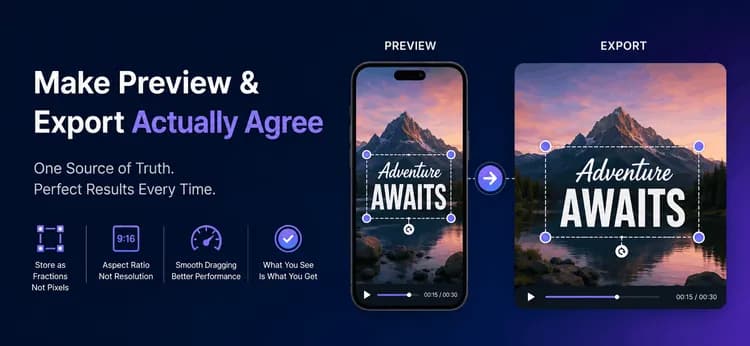
Bakit Nagsisinungaling ang Preview ng Iyong Video Tungkol sa Export
Mukhang tapos na ang iyong video editor. Malinaw ang preview, eksaktong nakapuwesto ang caption kung saan ito hinila ng user, at maayos ang pag-scrub ng timeline. Pagkatapos, pinindot ng user ang Export, at bumalik ang caption sa maling lugar, sa maling sukat, kung minsan ay putol pa sa gilid. Walang nag-crash, walang error sa log — hindi lang nagkakasundo ang preview at ang file.
Ito ang pinakakaraniwang bug sa bawat video editor, at isa itong problema sa data modeling sa halip na rendering. Nasa ibaba ang isang ugali na nagpapawala sa bug, kung paano sukatin nang tama ang mga frame mula sa isang aspect ratio, at kung paano panatilihing mabilis ang paghila sa murang mga telepono. Ang mga ideya ay nalalapat sa anumang wika o UI framework.
Ang Aspect Ratio ay Hugis, Ang Resolution ay Sukat
Karamihan sa mga bug ng frame ay nagsisimula rito. Ang isang aspect ratio ay naglalarawan ng hugis ng frame at wala nang iba: ang 9:16 ay patayo, ang 16:9 ay pahalang. Ang isang resolution ay naglalarawan ng sukat sa pixels, tulad ng 1080x1920. Sinusuportahan ng isang hugis ang maraming sukat, kaya't ang dalawang halaga ay hindi kailanman mapagpapalit.
| Aspect ratio | Numeric value | Karaniwang gamit |
| 16:9 | 1.78 | YouTube, landscape web |
| 9:16 | 0.56 | Reels, TikTok, Shorts |
| 1:1 | 1.00 | Mga post sa square feed |
| 4:5 | 0.80 | Mga post sa portrait feed |
Itago ang ratio bilang plain text at i-convert ito sa isang numero lamang kapag nagawa mo ang math. Mag-imbak ng target height para sa export, pagkatapos ay kunin ang width mula sa ratio, at pilitin ang parehong numero na maging even bago sila umabot sa isang encoder. Ang mga odd dimensions ang tahimik na sanhi ng nakakagulat na bilang ng mga failed export.
height = width / ratioToNumber(ratio) // sizing the preview box
function widthFromHeight(ratio, height): raw = height * ratioToNumber(ratio) return makeEven(round(raw)) // encoders require even sides
// 9:16 at 1080 tall -> 608 x 1080// 16:9 at 1080 tall -> 1920 x 1080
Itago ang Posisyon bilang Fractions, Huwag Bilang Pixels
Ang isang editor ay nabubuhay sa tatlong mundo sa tatlong magkakaibang sukat: ang naka-save na dokumento, ang on-screen na preview, at ang na-export na file. Ang dokumento ang tanging pinagmulan ng katotohanan — ang dalawa pa ay mga rendering lamang nito sa ibang scale.
Project -> Clip (source, trim, filters) -> Overlay (text / sticker)
Dokumento Preview renderer Export renderer x = 0.5, y = 0.9 --> x * 360 px --> x * 1080 px --> MP4 | ^ ^ +------------------------+------------------------+ isang naka-imbak na fraction, isang formula, dalawang sukat
Kung nag-iimbak ka ng 540 pixels, ang numerong iyon ay tama lamang sa device kung saan ito sinukat. Kung nag-iimbak ka ng 0.5, nangangahulugan itong "ang pahalang na sentro" sa bawat sukat magpakailanman. Ang bawat posisyon, offset at scale sa model ay dapat na isang fraction sa pagitan ng 0 at 1.
type Overlay { x: number // 0.0-1.0 pahalang (0.5 = sentro) y: number // 0.0-1.0 pababa (0.9 = malapit sa ibaba) scale: number // 1.0 = normal na sukat rotation: number // degrees startTimeMs: number // kung kailan ito lumilitaw endTimeMs: number // kung kailan ito nawawala}
Ang pag-export ay nagiging halos walang kapana-panabik, na siyang punto. Gumagamit ang renderer ng parehong formula tulad ng preview na may mas malaking multiplier: px = overlay.x * exportWidth. Hinahawakan ng FFmpeg ang frame mismo, at ang centring expression nito na (ow-iw)/2 ay ang parehong arithmetic na ginagamit ng preview para sa letterbox. Dahil hindi nagbago ang naka-imbak na halaga, ang caption ay eksaktong nakapuwesto sa tamang lugar.
ffmpeg -i input.mp4 \ -vf "scale=1080:1920:force_original_aspect_ratio=decrease,\ pad=1080:1920:(ow-iw)/2:(oh-ih)/2:0xD3D3D3" \ -c:v libx264 -crf 23 -pix_fmt yuv420p -c:a aac output.mp4
Idrowing ang Preview sa Isang Single Pass
Sukatin ang preview box sa runtime sa halip na i-hard-code ito, dahil ang isang telepono, isang tablet, at isang binagong sukat na desktop window ay magbibigay sa iyo ng iba't ibang sukat. Idrowing ang bawat overlay sa isang canvas pass sa halip na i-mount ang bawat isa bilang isang hiwalay na UI element — ang isang single pass ay nananatiling maayos habang gumagalaw ang isang daliri.
Dalawang patakaran ang nagpapanatili sa loop na tapat. Laktawan ang anumang overlay na nasa labas ng time range nito, at laging ipares ang save() sa restore() upang hindi makalabas ang transform ng isang item sa susunod.
function drawPreview(canvas, overlays, currentTime, box): for each overlay in overlays: if currentTime < overlay.startTimeMs: skip if currentTime > overlay.endTimeMs: skip
px = overlay.x * box.width // ang pangunahing formula py = overlay.y * box.height
canvas.save() canvas.move(px, py) canvas.rotate(overlay.rotation) canvas.resize(overlay.scale) canvas.drawText(overlay.content) canvas.restore() // hindi kailanman opsyonal
Panatilihing Maayos ang Paghila Gamit ang Two-Tier State
Ang isang daliring humihila ay nag-uulat ng humigit-kumulang animnapung posisyon bawat segundo. Kung ang bawat isa ay nagsusulat sa iyong project store, magbabayad ka para sa validation, persistence at isang buong state rebuild ng animnapung beses sa isang segundo, at kitang-kita ang pagka-stutter ng paghila. Hatiin ang trabaho sa dalawang antas sa halip:
- Tier 1, ephemeral: isang maliit na
liveDragmap na naglalaman kung nasaan ang daliri ngayon. I-update ito sa bawat paggalaw at muling ipinta ang canvas. Walang ibang tumatakbo. - Tier 2, durable: sa pagtatapos ng paghila, i-commit ang huling fraction sa overlay sa project model, i-clear ang
liveDragentry, at magtala ng isang undo step.
Ang benepisyo ay higit pa sa frame rate. Nananatiling kapaki-pakinabang ang undo history dahil ang isang paghila ay gumagawa ng isang entry sa halip na daan-daan, at itinitigil ng autosave ang pag-thrash ng disk. Ganito pinapanatili ng Figma at Canva ang direktang manipulation na responsive.
Konteksto sa Tunay na Mundo
Sa MicrocosmWorks, kinuha namin ang isang short-form editor na ang mga caption ay naglihis sa export. Pinanatili ng team ang posisyon ng mga overlay bilang device pixels na direktang binasa mula sa preview canvas, kaya ang isang caption na ginawa sa isang maliit na telepono ay lumitaw na mataas at maliit sa 1080p file, at ang pagpapalit ng aspect ratio ay nagtulak sa ilang overlay palabas ng frame.
Migrate namin ang model sa normalized na 0-to-1 coordinates, ginawa naming magbahagi ang parehong renderers ng isang single fraction-times-size helper, at ipinatupad ang even output dimensions na hango sa naka-imbak na ratio. Nagtugma ang Preview at export sa bawat test device. Ang paglipat ng drag commits sa drag-end ay nag-alis ng lag na iniulat ng mga user sa lower-end na Android hardware. Makikita mo ang uri ng short-form video at editing work na pinanggalingan nito sa aming project portfolio.
Konklusyon
Ang preview at ang export ay dalawang rendering ng isang dokumento, kaya't bigyan sila ng isang source of truth. Itago ang mga posisyon bilang fractions, gamitin ang parehong fraction-times-size formula sa parehong renderers, kunin ang width mula sa aspect ratio, panatilihing even ang mga dimensions, at i-commit ang mga pagbabago sa paghila lamang kapag umangat ang daliri. Ang limang ugaling iyon ay nag-aalis ng buong kategorya ng bug bago pa man ito maisulat.
Ang pagbuo ng media engines kung saan nagtutugma ang interactive view at ang final file ay isang pangunahing pokus ng aming video and streaming engineering work sa MicrocosmWorks.
Nagpapadala ng video o content editor at gusto mong magkasundo talaga ang preview at export? Nalutas na namin ang eksaktong uri ng bug na ito sa mga short-form editing tools. Makipag-usap sa aming engineering team →
Magbasa pa mula sa aming team
1. Pag-optimize ng Logo ng Channel para sa Iba't Ibang Video Resolutions
2. Snap a Plate, Log a Meal: Isang Computer-Vision Nutrition Pipeline
3. Pag-optimize ng Logo ng Channel para sa Iba't Ibang Video Resolutions