
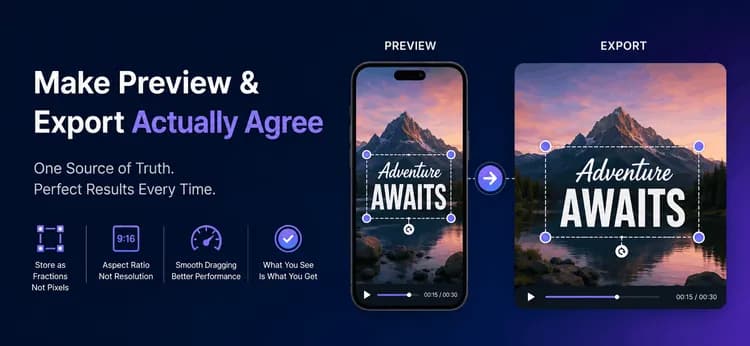
لماذا تعطي معاينة الفيديو الخاص بك معلومات خاطئة حول التصدير
يبدو محرر الفيديو الخاص بك مكتملاً. المعاينة واضحة، والتعليق التوضيحي موجود تمامًا حيث سحبه المستخدم، والشريط الزمني يتحرك بسلاسة. ثم يضغط المستخدم على Export، ويعود التعليق التوضيحي في المكان الخاطئ، بحجم خاطئ، وأحيانًا يتم قصه تمامًا من الحافة. لم يحدث أي عطل، لا يوجد خطأ في السجل — المعاينة والملف ببساطة لا يتفقان.
هذه هي المشكلة الأكثر شيوعًا في كل محرر فيديو، وهي مشكلة نمذجة بيانات وليست مشكلة عرض. فيما يلي العادة الوحيدة التي تجعل هذا الخطأ مستحيلاً، وكيفية تحديد حجم الإطارات بشكل صحيح من نسبة العرض إلى الارتفاع (aspect ratio)، وكيفية الحفاظ على سرعة السحب في الهواتف الرخيصة. تنطبق هذه الأفكار في أي لغة أو إطار عمل واجهة مستخدم (UI framework).
نسبة العرض إلى الارتفاع (Aspect Ratio) هي شكل، والدقة (Resolution) هي حجم
تبدأ معظم أخطاء الإطارات هنا. تصف نسبة العرض إلى الارتفاع (aspect ratio) شكل الإطار لا أكثر: 9:16 طويل، 16:9 عريض. تصف الدقة (resolution) الحجم بالبكسل، مثل 1080x1920. شكل واحد يدعم العديد من الأحجام، لذا فإن القيمتين غير قابلتين للتبادل أبدًا.
| نسبة العرض إلى الارتفاع | القيمة الرقمية | الاستخدام النموذجي |
| 16:9 | 1.78 | YouTube، ويب أفقي |
| 9:16 | 0.56 | Reels، TikTok، Shorts |
| 1:1 | 1.00 | منشورات الخلاصات المربعة |
| 4:5 | 0.80 | منشورات الخلاصات الرأسية |
خزّن النسبة كنص عادي وحولها إلى رقم فقط عند إجراء العمليات الحسابية. خزّن ارتفاعًا مستهدفًا للتصدير، ثم استنتج العرض من النسبة، واجعل كلا الرقمين زوجيين قبل أن يصلا إلى برنامج الترميز (encoder). الأبعاد الفردية هي السبب الصامت لعدد مفاجئ من عمليات التصدير الفاشلة.
height = width / ratioToNumber(ratio) // sizing the preview box
function widthFromHeight(ratio, height): raw = height * ratioToNumber(ratio) return makeEven(round(raw)) // encoders require even sides
// 9:16 at 1080 tall -> 608 x 1080// 16:9 at 1080 tall -> 1920 x 1080
خزّن المواضع ككسور، لا كبكسلات أبدًا
يعيش المحرر في ثلاثة عوالم بأحجام مختلفة: المستند المحفوظ، المعاينة على الشاشة، والملف المصدر. المستند هو المصدر الوحيد للحقيقة — والاثنان الآخران مجرد عروض له بمقياس مختلف.
Project -> Clip (source, trim, filters) -> Overlay (text / sticker)
Document Preview renderer Export renderer x = 0.5, y = 0.9 --> x * 360 px --> x * 1080 px --> MP4 | ^ ^ +------------------------+------------------------+ one stored fraction, one formula, two sizes
إذا خزّنت 540 بكسلًا، فإن هذا الرقم يكون صحيحًا فقط على الجهاز الذي تم قياسه عليه. إذا خزّنت 0.5، فهذا يعني "المركز الأفقي" عند كل حجم إلى الأبد. يجب أن يكون كل موضع وإزاحة ومقياس في النموذج كسرًا بين 0 و1.
type Overlay { x: number // 0.0-1.0 across (0.5 = centre) y: number // 0.0-1.0 down (0.9 = near bottom) scale: number // 1.0 = normal size rotation: number // degrees startTimeMs: number // when it appears endTimeMs: number // when it disappears}
يصبح التصدير بعد ذلك مملًا تقريبًا، وهذا هو الهدف. يستخدم برنامج العرض (renderer) نفس الصيغة المستخدمة في المعاينة ولكن بضارب أكبر: px = overlay.x * exportWidth. يتعامل FFmpeg مع الإطار نفسه، وتعبيره المركزي (ow-iw)/2 هو نفس العملية الحسابية التي تستخدمها المعاينة لإنشاء Letterbox. ولأن القيمة المخزنة لم تتغير أبدًا، فإن التعليق التوضيحي يهبط في مكانه الصحيح تمامًا.
ffmpeg -i input.mp4 \ -vf "scale=1080:1920:force_original_aspect_ratio=decrease,\ pad=1080:1920:(ow-iw)/2:(oh-ih)/2:0xD3D3D3" \ -c:v libx264 -crf 23 -pix_fmt yuv420p -c:a aac output.mp4
ارسم المعاينة في تمريرة واحدة
قم بقياس مربع المعاينة في وقت التشغيل بدلاً من ترميزه بشكل ثابت (hard-coding)، حيث أن الهاتف والجهاز اللوحي ونافذة سطح المكتب التي تم تغيير حجمها كلها تعطيك حجمًا مختلفًا. ارسم كل تراكب (overlay) في تمريرة واحدة على Canvas بدلاً من تثبيت كل عنصر كعنصر UI منفصل — تمريرة واحدة تظل سلسة بينما يتحرك الإصبع.
تحافظ قاعدتان على صحة الحلقة (loop). تخطى أي تراكب خارج نطاقه الزمني، واقرن دائمًا save() بـ restore() حتى لا يتسرب تحويل (transform) عنصر واحد إلى العنصر التالي.
function drawPreview(canvas, overlays, currentTime, box): for each overlay in overlays: if currentTime < overlay.startTimeMs: skip if currentTime > overlay.endTimeMs: skip
px = overlay.x * box.width // the key formula py = overlay.y * box.height
canvas.save() canvas.move(px, py) canvas.rotate(overlay.rotation) canvas.resize(overlay.scale) canvas.drawText(overlay.content) canvas.restore() // never optional
حافظ على سلاسة السحب باستخدام حالة ذات مستويين
يبلغ الإصبع الذي يقوم بالسحب عن ما يقرب من ستين موضعًا في الثانية. إذا كتب كل موضع إلى مخزن مشروعك، فسوف تدفع ثمن التحقق (validation) والاستمرارية (persistence) وإعادة بناء الحالة الكاملة ستين مرة في الثانية، وسيتعثر السحب بشكل واضح. قم بتقسيم العمل إلى مستويين بدلاً من ذلك:
- المستوى الأول، مؤقت: خريطة
liveDragصغيرة تحتوي على مكان الإصبع الآن. قم بتحديثها في كل حركة وأعد رسم Canvas. لا شيء آخر يعمل. - المستوى الثاني، دائم: عند انتهاء السحب، قم بتثبيت الكسر النهائي (final fraction) على التراكب (overlay) في نموذج المشروع، امسح إدخال
liveDrag، وسجّل خطوة تراجع واحدة.
تتجاوز الفائدة معدل الإطارات (frame rate). يظل سجل التراجع (Undo history) مفيدًا لأن عملية السحب تنتج إدخالًا واحدًا بدلاً من المئات، ويتوقف الحفظ التلقائي (autosave) عن إرهاق القرص. هذه هي الطريقة التي تحافظ بها Figma و Canva على استجابة التلاعب المباشر.
السياق الواقعي
في MicrocosmWorks، عملنا على محرر مقاطع فيديو قصيرة كانت تعليقاته التوضيحية تنحرف عند التصدير. كان الفريق قد احتفظ بمواضع التراكبات كبكسلات للجهاز مقروءة مباشرة من معاينة Canvas، لذلك فإن تعليقًا توضيحيًا تم إنشاؤه على هاتف صغير ظهر مرتفعًا وصغيرًا في ملف 1080p، وتسبب تبديل نسبة العرض إلى الارتفاع (aspect ratio) في دفع بعض التراكبات خارج الإطار تمامًا.
قمنا بترحيل النموذج إلى إحداثيات طبيعية تتراوح من 0 إلى 1، وجعلنا كلا برنامجَي العرض (renderers) يتشاركان مساعدًا واحدًا لـ "الكسر مضروبًا في الحجم" (fraction-times-size helper)، وفرضنا أبعاد إخراج زوجية مستنبطة من النسبة المخزنة. تطابقت المعاينة والتصدير على كل جهاز اختبار. أدى نقل عمليات تثبيت السحب إلى نهاية السحب إلى إزالة التأخير الذي أبلغ عنه المستخدمون على أجهزة Android ذات الفئة الأدنى. يمكنك رؤية نوع عمل الفيديو القصير والتحرير الذي نتج عن هذا في حافظة مشاريعنا.
الخاتمة
المعاينة والتصدير هما عرضان لمستند واحد، لذا امنحهما مصدرًا واحدًا للحقيقة. خزّن المواضع ككسور، استخدم نفس صيغة "الكسر مضروبًا في الحجم" (fraction-times-size) في كلا برنامجَي العرض، استنتج العرض من نسبة العرض إلى الارتفاع، حافظ على الأبعاد زوجية، وثبّت تغييرات السحب فقط عند رفع الإصبع. تزيل هذه العادات الخمس فئة كاملة من الأخطاء قبل كتابتها.
إن بناء محركات الوسائط حيث تتوافق طريقة العرض التفاعلية والملف النهائي هو محور تركيز أساسي في عملنا الهندسي في مجال الفيديو والبث في MicrocosmWorks.
هل تقوم بتطوير محرر فيديو أو محتوى وترغب في أن تتوافق المعاينة والتصدير بالفعل؟ لقد حللنا هذه الفئة الدقيقة من الأخطاء في أدوات تحرير الفيديو القصير. تحدث إلى فريقنا الهندسي ←
اقرأ المزيد من فريقنا
1. تحسين شعار القناة لقرارات الفيديو المختلفة
2. التقط صورة لطبق، سجل وجبة: مسار عمل التغذية بالرؤية الحاسوبية