
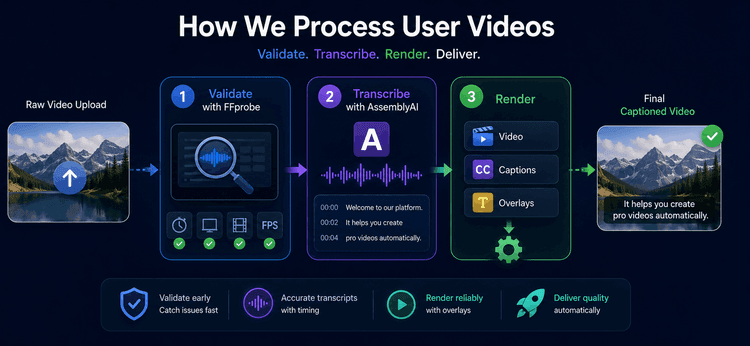
When a user uploads video to Adstacker, they expect one thing: their clips should turn into polished ad variations without a confusing wait, a broken export, or subtitles that drift out of sync. Behind that simple workflow is a deliberately staged AI-powered video pipeline. We validate every asset before it enters a project, turn speech into frame-accurate subtitle data, then render reusable creative components before assembling final variations.
This is how Adstacker processes user videos—from upload to export—and why the architecture is designed for reliable creative volume.
The challenge: video inputs are rarely production-ready by default
Video files can look similar in a file picker while behaving very differently in a render pipeline. A clip may have an unexpected duration, low resolution, a rotation flag from a phone camera, or no usable video stream at all. If we discover those problems after a project has started rendering, users lose time and compute is wasted.
Subtitles add a second challenge. A transcript alone is not enough for a social ad. Text needs word-level timing so it appears with the speaker, stays readable, and never overlaps the next line.
Finally, Adstacker is built to create many combinations from a small set of assets. Re-rendering identical captioned clips for every hook, body, CTA, and subtitle-style combination would be unnecessarily slow and expensive.
Our solution: a staged pipeline with clear responsibilities
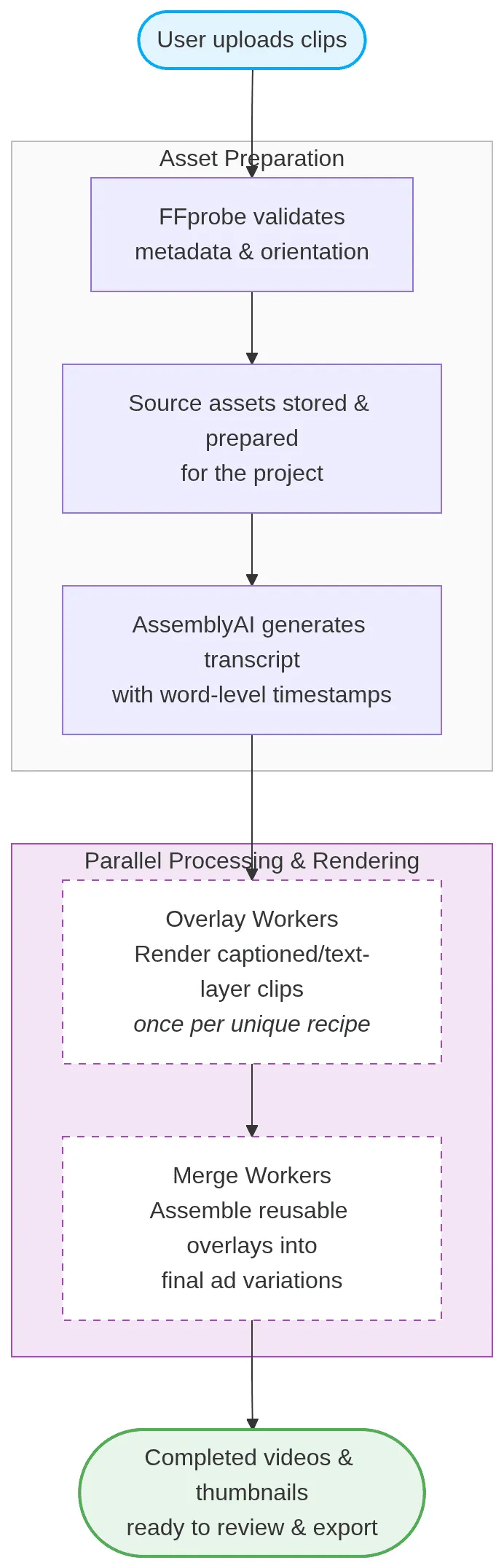
We separate validation, transcription, overlay rendering, and final assembly. Each stage produces a durable result that the next stage can use, allowing the system to retry a failed step without restarting the full project.
Architecture
1. FFprobe catches bad inputs before a project begins
Before Adstacker commits uploaded clips to a project, it runs FFprobe—a lightweight media-inspection tool—against every file. We read the details that matter to a reliable output:
- A real video stream is present.
- Duration is inside the project’s allowed range.
- Effective resolution meets our minimum quality bar and does not exceed the configured maximum.
- Frame rate is available for timing calculations.
- Display orientation is correct, including phone videos whose rotation lives in metadata rather than pixel dimensions.
This is a fail-fast gate. If an asset will not produce a dependable ad, the creator gets a useful message before rendering begins. It also lets us choose a bounded base resolution for the project, so downstream workers operate on a predictable canvas instead of handling every raw source size independently.
2. AssemblyAI turns speech into usable subtitle timing
For projects using subtitles, we send the source audio through AssemblyAI and receive more than a block of text: we receive individual words with start and end timestamps. Those timestamps are the bridge between spoken language and visual timing.
We normalize the timing into seconds, convert it to frames at the project’s target frame rate, and group words into short subtitle chunks. The grouping is intentional: a new caption begins after a meaningful pause or once the current line reaches a readable length. We also clamp adjacent chunks so only one is visible in any frame, even when source word timings overlap.
The result is subtitle data that is concise, frame-aware, and ready for a chosen visual style—not a generic transcript pasted onto a video.
3. Render shared overlays once, then reuse them
The key to creative scale is avoiding duplicate work. An Adstacker project may pair the same hook clip with many body clips, CTAs, text layers, and subtitle styles. We render a captioned or text-layered segment once for each unique recipe, rather than once for every final combination that happens to use it. This mirrors the automated captioning approach we built for Ssemble, a short-form video creation platform in our portfolio.
An overlay worker receives the prepared source video, the target aspect ratio, custom text layers, and the subtitle chunks. It renders the visual treatment on a consistent canvas and stores the completed overlay as a reusable asset. The final merge stage then selects the correct hook, body, and CTA overlays and assembles the finished variation.
This division gives us two practical benefits:
- Reuse lowers render work when many combinations share the same building blocks.
- Independent retries allow a failure in one overlay or one final merge to be fixed without discarding completed work.
Real-world example: one product shoot, dozens of testable ads
Imagine a skincare brand uploads three hooks, two product demonstrations, and two CTAs. It also selects two subtitle styles. The creative possibilities multiply quickly, but several final videos reuse the same source segment and caption treatment.
Adstacker validates all seven clips up front, accounts for any portrait-orientation metadata, and builds timed subtitle chunks from each spoken segment. It then creates each needed overlay once. When the final combinations are assembled, the system reuses those prepared pieces instead of repeatedly recreating them.
The brand gets a consistent set of ready-to-test ads, while the pipeline does the minimum necessary work to create them.
Built for dependable creative volume
At Adstacker, video processing is not one opaque “render” button. It is a sequence of focused steps: validate the source, understand the speech, render reusable layers, and assemble the final creative. That structure helps us protect quality at upload, keep captions in sync, and scale variations without scaling waste, running on cloud infrastructure built for elastic, containerized workloads.
Upload your video assets, choose the creative building blocks you want to test, and let Adstacker handle the production pipeline behind the scenes.
Technology stack: NestJS · FFprobe · AssemblyAI · AWS S3 · AWS ECS Fargate · Remotion · FFmpeg · MongoDB
Read more from our team
1. Export Service vs. Video Editor Pipeline