
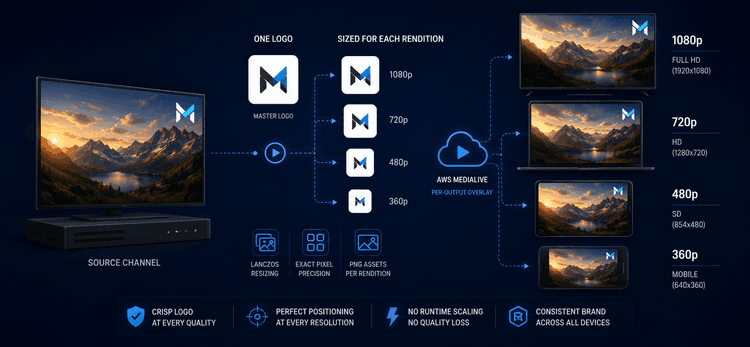
FAST-kanavan logo – pieni merkki kulmassa – on visuaalinen vakio kaikissa ohjelmissa, kaikissa mainoskatkoissa, kaikissa kanavan esittämissisällöissä. Sen on näytettävä ammattimaiselta kaikilla laadun tasoilla, joilla katsoja saattaa sen vastaanottaa. Naiivi lähestymistapa – yhden pääkuvan lataaminen ja sen antaminen AWS MediaLiven skaalattavaksi kullekin renderoinnille – tuottaa terävän logon 1080p-resoluutiolla ja selvästi pehmeän 360p-resoluutiolla. Tämä on brändiongelma jokaiselle katsojalle, jolla ei ole laajakaistaa. Tässä on, miten me sen sijaan mitoitimme logon kunkin renderoinnin tarkkaan pikseliruudukkoon.
Nopea yleiskatsaus
| Näkökohta | Yksityiskohta |
|---|---|
| Toimialue | Kanavan logo (DOG) -peittokuva FAST-kanavilla |
| Mekanismi | Tulostekohtainen StaticImageOutputActivate renderoinnin mukaan (1080p, 720p, 480p, 360p) |
| Resurssien luonti | Python-skripti, joka käyttää Lanczos-uudelleennäytteistystä |
| Aktivoinnin ajoitus | 1,5s jokaisen ohjelman syötteen vaihdon jälkeen |
| Tila | 1x renderoinnin mukainen pino tuotannossa |
Liiketoimintaongelma
FAST-kanava ei toimita yhtä laatutasoa. MediaLive koodaa saman kanavan useiksi renderoinneiksi – 1080p, 720p, 480p, 360p – ja kunkin katsojan soitin valitsee parhaan, jonka heidän yhteytensä pystyy ylläpitämään. Mobiilikatsojat mobiilidatalla katsovat 360p-resoluutiolla; älytelevision katsojat laajakaistalla saavat 1080p-resoluution. He kaikki katsovat samaa brändimerkkiä, ja he kaikki odottavat sen näyttävän ammattimaiselta. Kun logo on terävä 1080p-resoluutiolla ja selvästi pehmeä 360p-resoluutiolla, brändi on epäjohdonmukainen – ei pieni yksityiskohta 24/7-kanavalla, jossa logo on ainoa elementti, jonka katsojat näkevät enemmän kuin minkään yksittäisen ohjelman.
Missä peittokuvat todella sovelletaan
Monirenderoinnin koodausputkilinjassa peittokuva voidaan soveltaa kahdessa paikassa:
Ennen renderoinnikohtaista skaalainta, jossa yksi pääkuva yhdistetään lähteeseen ja koko sisältö skaalataan alas tulostekohtaisesti – näin MediaLive tekee globaalilla StaticImageActivate -toiminnolla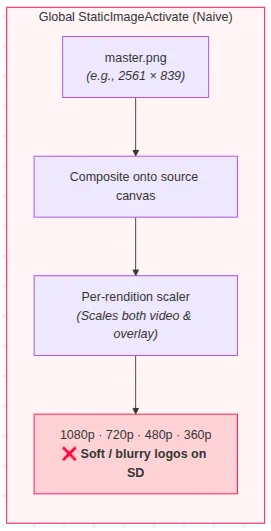
skaalaimen jälkeen, jossa jokainen tuloste saa oman peittokuvansa sovellettuna, kun kangas on jo lopullisessa koossa. Ero näyttää pieneltä API:ssa. Visuaalisesti se ei ole. Kaikki ennen skaalainta yhdistetyt elementit perivät kaikki skaalaimen tuottamat artefaktit, ja 360p-resoluutiolla skaalain on aggressiivinen.
Miksi ilmeiset korjaukset epäonnistuvat
"Lataa yksi pääkuva ja anna MediaLiven skaalata se." Globaali toiminto yhdistää pääkuvan ennen tulostekohtaisen skaalaimen käynnistymistä. Suuri pääkuva, joka skaalataan 64x21 pikselin logoksi 360p-resoluutiota varten, on noin 40-kertainen pienennys – jopa Lanczos-uudelleennäytteistys menettää hienot yksityiskohdat tässä suhteessa, ja tulos kulkee sitten saman pakkausketjun läpi kuin itse video.
"Käytä isompaa pääkuvaa." Tämä tekee pienennyssuhteesta suuremman, ei pienemmän – artefakti pahenee, ei parane.
"Ohita logo SD-tulosteissa." Vaatimustenmukaisuus- ja brändivaatimukset edellyttävät merkin läsnäoloa jokaisessa renderoinnissa. Ei vaihtoehto.
"Polta logo lähdevideoon koodausvaiheessa." Menettää kaikki operatiiviset vipuvoimat – ei kampanjakohtaisia tai aluekohtaisia logon muutoksia, eikä päivitystä ilman koko kirjaston uudelleenkoodausta.
"Käytä globaalia peittokuvaa manuaalisilla koordinaateilla resoluution mukaan." Globaali toiminto laskee sijainnin kiinteää 1920x1080-referenssiä vasten, joten sitä kapeammat lähdevideot tuottavat kankaan ulkopuolisia koordinaatteja – logo ajelehtii kulmasta pois tai leikkautuu.
Todellinen vipuvarsi oli MediaLiven peittokuvan skaalauksen ohittaminen kokonaan: mitoita logo itse kunkin renderoinnin kankaaseen, ennen kuin kooderi edes koskee sitä.
Ratkaisu
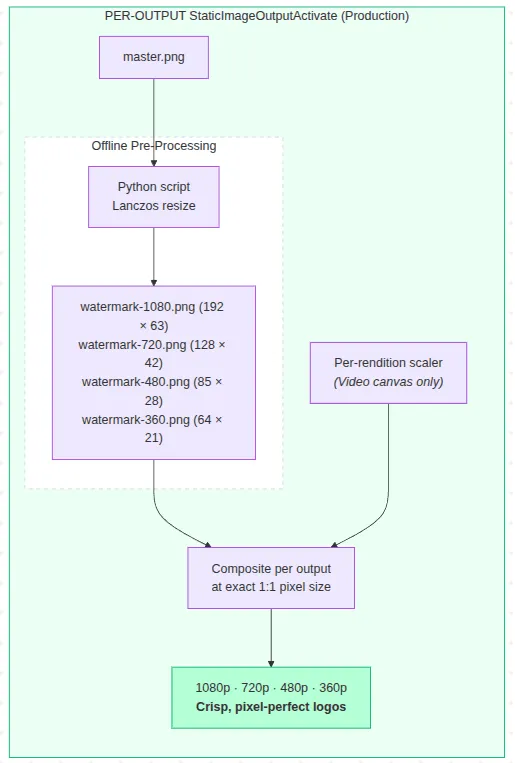
Kunkin renderoinnin logo esirenderoidaan sen tarkkoihin pikselimitoihin ja tallennetaan erillisenä PNG-kuvana. Jokaisessa ohjelman rajapinnassa Lambda-orkestroija lähettää neljä StaticImageOutputActivate -toimintoa – yhden per renderointi – joista jokainen osoittaa kyseistä tulostetta varten jo mitoitettuun PNG-tiedostoon. MediaLive ei suorita skaalausta peittokuvaan.
GLOBAALI (naiivi)                 TULOSTETKOHTAINEN (toteutuksemme)
master.png ──► yhdistetään        master.png ──► Lanczos-skaalaus (offline)
               lähdekankaalle                    4 tarkkakokoiseksi PNG-kuvaksi
                    │                                  │
                    ▼                                  ▼
           renderoinnin mukainen skaalain    renderoinnin mukainen skaalain
           (skaalaa myös                     (peittokuvaan ei kosketa —
            peittokuvan → pehmeä logo         yhdistetään jälkeenpäin,
            SD-tulosteissa)                   tarkalla pikselikoolla)
Python-skripti luo neljä mitoitettua PNG-kuvaa yhdestä pääkuvasta Lanczos-uudelleennäytteistyksellä, joka valittiin pienten kokojen ennustettavan, toistettavan käyttäytymisen vuoksi pikemminkin kuin pikselilaatukilpailun voittamiseksi. Jokainen logo asettuu noin 10 %:iin kankaan leveydestä – näkyvä ilman häiritsemistä – ja uuden renderoinnin lisääminen on yksi taulukon merkintä plus yksi uusi PNG-kuva.
Keskeisiä mainitsemisen arvoisia päätöksiä
Aktivoinnin viive 1,5 sekuntia. Vesileiman aktivointitoiminnot käynnistyvät 1,5 sekuntia jokaisen syötteen vaihdon jälkeen, ei tarkalleen vaihtohetkellä – välitön aktivointi voi aiheuttaa välkkymistä vielä vakaantumattomia kehyksiä vasten. Arvo viritettiin empiirisesti ja keskitettiin yhdeksi vakioksi, jotta tuleva viritys on yhden rivin muutos.
Offline, ihmisen käynnistämä resurssien luonti – tarkoituksella. Lanczos-skaalausputkilinjaa ei ole automatisoitu osana rakennusvaihetta tai CDN-puolen muunnosta. Logoaineistot muuttuvat riittävän harvoin, jotta yhden komennon uudelleenluonti on sopiva automaatiotaso; lisäautomaation rakentamisen kustannukset ylittävät skriptin ajamisen kahdesti vuodessa.
"Paksu" variantti on olemassa, mutta sitä ei ole otettu käyttöön. Generaattori tuottaa myös laajennetun alfan variantin paksummilla vedoilla, tarkoituksena selviytyä H.264-kvantisoinnista matalilla SD-bittinopeuksilla. Se ei ole tuotannossa – standardivariantti riittää nykyiselle bittinopeusalueelle, eikä mikään mittaus toistaiseksi oikeuta vaihtoa. Se on olemassa kooditestattuna varavaihtoehtona: halpa pitää saatavilla, mutta ennenaikaista ottaa käyttöön.
Mitä seuraamme edelleen
Mikään tuotannon videoputkilinja ei ole koskaan todella valmis, ja on edelleen mahdollisuuksia hienosäätää tätä lähestymistapaa ajan mittaan.
Nykyinen toteutus varmistaa, että jokainen renderointi saa logon, joka on valmisteltu erityisesti sen omaa tulostusresoluutiota varten, eliminoiden ajonaikaisen peittokuvan skaalauksen MediaLive-putkilinjasta. Lopullista ulkonäköä rajoittavat kuitenkin luonnollisesti kunkin renderoinnin resoluutio ja videon pakkaus, erityisesti matalammilla bittinopeuksilla. Striimausprofiilien kehittyessä jatkamme arviointia siitä, tuottavatko erilaiset logon käsittelyt mitattavia visuaalisia etuja näissä olosuhteissa.
Resurssigeneraattori tukee jo sekä standardi- että paksumpaa logovariaatiota. Jos tulevat testit osoittavat, että paksumpi versio toimii paremmin matalampien bittinopeuksien renderoinneissa, teemme logovariaation valinnasta konfiguraatioon perustuvan, jotta sitä voidaan muuttaa uudelleenkäynnistämättä sovellusta.
Tulokset
Jokainen renderointi saa nyt logon, joka on mitoitettu erityisesti sen omalle kankaalle, ja MediaLive ei suorita lainkaan ajonaikaista peittokuvan skaalausta. Jokainen tuloste käyttää kohderesoluutiota varten valmistettua kuvitusta, välttäen ajonaikaisen peittokuvan skaalauksen aiheuttaman lisäpehmenemisen ja säilyttäen parhaan käytännöllisen visuaalisen laadun, jonka renderointi voi tarjota.
Koordinaattien siirtymävirhe edellisestä globaalista peittokuvalähestymistavasta, jossa logot saattoivat siirtyä kapeammissa kuin 1920 pikselin lähdevideoissa, on rakenteellisesti eliminoitu, koska tulostekohtainen aktivointi toimii täysin tulostekoordinaateissa.
Logon vaihtaminen on nyt yksinkertainen operatiivinen tehtävä: luo uudelleen renderointikohtaiset resurssit yhdellä skriptillä ja lataa ne. Videon uudelleenkoodausta tai renderoinnin mukaista manuaalista muokkausta ei tarvita.
Tämä toteutus noudattaa yksinkertaista suunnitteluperiaatetta: ratkaise ongelmat mahdollisimman aikaisin putkilinjassa ja suunnittele alustan ominaisuuksien ympärille sen sijaan, että turvautuisit myöhempien vaiheiden kiertotapoihin. Valmistelemalla oikean resurssin ennen koodausta live-putkilinja pysyy yksinkertaisempana, ennustettavampana ja helpommin ylläpidettävänä.
Jos kohtaat vastaavia renderointi- tai peittokuvan laatuongelmia live-videoputkilinjassa, ota yhteyttä.
Teknologiapino: AWS MediaLive · AWS Lambda · AWS S3 · NestJS · TypeScript · Python (Pillow)