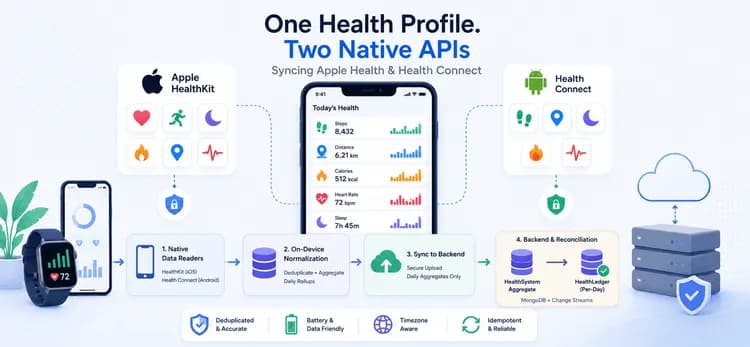
Les pas, la distance, les calories, la fréquence cardiaque et le sommeil doivent être extraits de la plateforme de l'utilisateur (Android Health Connect sur Android, Apple HealthKit sur iOS) par une application de santé et de nutrition — et les présenter sous la forme d'un profil quotidien unique, propre et dédupliqué. Il y a très peu de similitudes entre les deux APIs : des mécanismes de lecture distincts, des schémas d'autorisation différents et des structures de données distinctes. Nous avons construit la couche de synchronisation mobile qui les fait apparaître comme un seul ensemble.
Le Défi
- Deux APIs natives qui ne s'accordent sur rien. Apple HealthKit renvoie des agrégats quotidiens via des callbacks ; Health Connect renvoie des échantillons bruts, paginés, avec de riches métadonnées de source. Mêmes concepts, formes complètement différentes — et l'application devait normaliser les deux en un seul schéma.
- Le double-comptage est la valeur par défaut. Un téléphone, une smartwatch et une application tierce peuvent tous rapporter les mêmes 8 000 pas. Les additionner naïvement gonfle chaque métrique. L'application devait reconnaître les sources qui se chevauchent et compter chaque activité réelle une seule fois.
- La batterie et le réseau ne peuvent pas payer pour la fraîcheur des données. Les données de santé changent toute la journée, mais lire l'historique complet à chaque synchronisation épuiserait la batterie et saturerait les connexions cellulaires. La cadence de synchronisation devait rester légère tout en donnant l'impression d'être en direct.
Les permissions peuvent être confuses. Des dizaines de types de données, deux modèles de permissions, des restrictions de lecture en arrière-plan, et des utilisateurs qui accordent certaines portées mais pas d'autres — tout cela doit être géré par l'application sans interrompre le flux.
Notre Solution
Nous avons construit une synchronisation à trois couches : une fine couche native lit l'API de chaque plateforme, une couche de normalisation sur l'appareil déduplique et agrège les données en résumés quotidiens, et le backend les stocke et les réconcilie dans un unique registre de confiance. Le client n'envoie jamais d'échantillons bruts — il envoie des agrégations quotidiennes propres et corrigées pour le fuseau horaire.
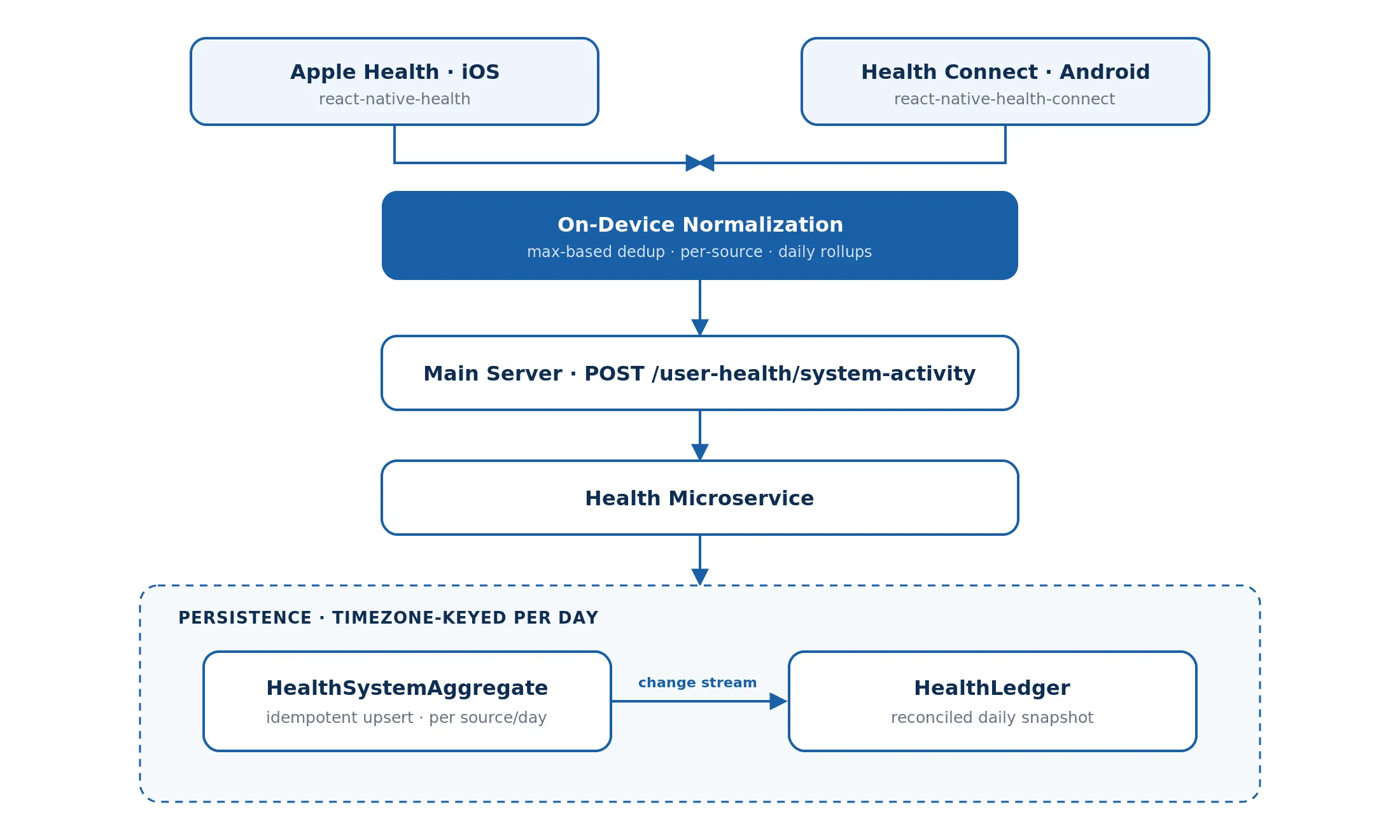
Architecture
- iOS lit Apple HealthKit via react-native-health ; Android lit Health Connect via react-native-health-connect.
- La normalisation sur l'appareil transforme la sortie des deux plateformes en un seul schéma et déduplique les données avant qu'elles ne quittent le téléphone.
- Déclencheurs de synchronisation — 30 jours d'historique au premier lancement, puis des lectures incrémentielles légères d'une journée toutes les 10 minutes et à chaque reprise de l'application.
- Transport — les agrégations quotidiennes normalisées sont POSTées vers le /user-health/system-activity du serveur principal, qui les transmet (avec l'ID utilisateur + le fuseau horaire) au microservice de santé.
- Persistance — chaque source/jour est stocké de manière idempotente comme un HealthSystemAggregate ; un flux de changements MongoDB le réconcilie ensuite dans un HealthLedger par jour.
Flux de travail géré Expo / React Native avec les modules natifs HealthKit et Health Connect.
Fonctionnalités Clés
- Un contrat de normalisation unique pour deux APIs. Les lecteurs spécifiques à la plateforme alimentent une seule étape formatHealthData qui émet la même forme quelle que soit la source — ainsi le backend et l'interface utilisateur ne se différencient jamais entre iOS et Android.
2. Déduplication basée sur le maximum sur l'appareil. Au sein de chaque source, les lectures d'une journée sont additionnées ; puis la valeur quotidienne est le Math.max() à travers les sources (calories indexées par source|deviceType), de sorte que plusieurs lectures d'un même appareil s'accumulent tandis qu'une montre et un téléphone rapportant le même jour ne sont pas comptabilisés en double :
// Sum readings within each source, then take the max ACROSS sources dateSourceMap[date][source] += entry.count; const totalSteps = Math.ceil(Math.max(...Object.values(dateSourceMap[date]))); |
3.La bonne stratégie de lecture par plateforme. Les lectures de Health Connect sont paginées avec une boucle pageToken (1 000 enregistrements/page) ; les agrégats quotidiens de HealthKit sont parcourus jour par jour. Chaque particularité est contenue dans son propre lecteur, invisible pour le reste de l'application.
4. Une cadence de synchronisation qui respecte la batterie. Un remplissage complet de 30 jours ne s'exécute qu'une seule fois (protégé par un indicateur de premier appel) ; après cela, chaque synchronisation ne récupère qu'un seul jour — rapide sur les données cellulaires, économique en énergie.
5. Regroupement quotidien corrigé par fuseau horaire. Les échantillons sont regroupés en clés YYYY-MM-DD dans le fuseau horaire de l'utilisateur, de sorte qu'un entraînement à 23h atterrisse le bon jour, quel que soit l'emplacement du serveur.
6. Écritures idempotentes côté backend. Chaque agrégation effectue un upsert sur (userId, deviceId, source, date) — renvoyer le même jour est une no-op, ce qui sécurise les tentatives et les synchronisations qui se chevauchent.
7. Dégradation honnête. Les permissions manquantes, les lectures vides et les erreurs de limite de débit de Health Connect sont interceptées et affichées proprement — un jour vide ne fait jamais planter la synchronisation, et l'utilisateur reçoit une invite claire au lieu d'un échec silencieux.
Résultats
- Un profil de santé unique et cohérent sur iOS et Android — la différence de plateforme est invisible pour le reste de l'application.
- Les sources d'appareils/applications qui se chevauchent sont dédupliquées, de sorte que les pas et les calories reflètent la réalité au lieu de sommes gonflées.
- Les synchronisations incrémentielles légères maintiennent les données à jour sans vider la batterie ni consommer les données mobiles.
Les écritures idempotentes et corrigées par fuseau horaire signifient que chaque métrique arrive le bon jour, et les tentatives ne corrompent jamais l'enregistrement.
Pile Technologique
React Native (Expo) · react-native-health (HealthKit) · react-native-health-connect · NestJS · MongoDB · MongoDB Change Streams · moment-timezone