
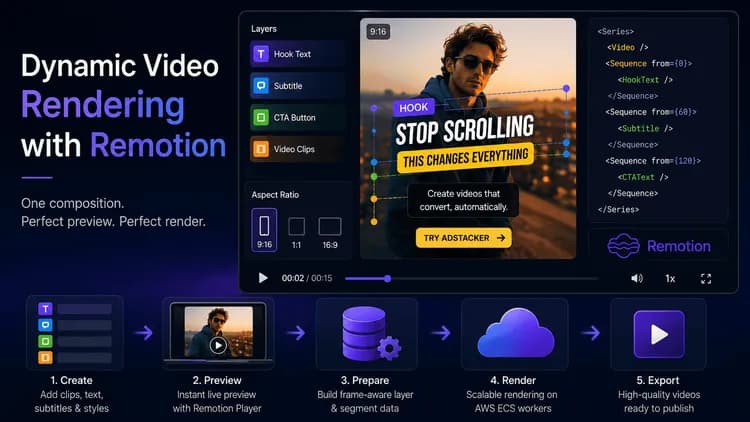
Sa Adstacker, ang isang video ad ay kombinasyon ng mga clips, subtitle timing, text layers, styles, animations, aspect ratios, at calls to action. Kailangang makita agad ng mga creator ang mga pagpipiliang ito—at ang natapos na export ay dapat magkatugma.
Iyan ang dahilan kung bakit ginagamit namin ang Remotion. Ang React-based na komposisyon nito ay nagbibigay-kapangyarihan sa mga editable na preview at nagbibigay ng parehong visual rules para sa na-render na video. Binibigyan namin ng kahulugan ang creative nang isang beses at pinananatili naming nakahanay ang dalawang karanasan.
Ang hamon: preview at export ay madalas na nagkakahiwalay
Ang mga creative tools ay karaniwang nahaharap sa isang nakakabigo na problema: tama ang hitsura ng editor preview, ngunit hindi ang exported file. Maaaring lumipat ang posisyon ng text, maaaring magkaiba ang pag-wrap ng font, maaaring lumabas ang mga caption sa maling sandali, o maaaring magkaiba ang pagkakasunod-sunod ng mga clips pagkatapos ng export.
Lumalaki ang problema kapag ang mga user ay naghahalo ng mga segment, pumipili ng subtitle styles, nagdaragdag ng hook/body/CTA text, at nagbabago ng output aspect ratio. Kung ang bawat surface ay nagbibigay-kahulugan sa mga setting na ito nang magkahiwalay, lumalaki ang maliliit na pagkakaiba.
Kailangan ng Adstacker ng agarang previews at scalable rendering. Ang komposisyon ay dapat na flexible para sa pag-edit at predictable sa production.
Isang shared na komposisyon para sa preview at rendering
Ang aming sentral na building block ay isang shared na Remotion VideoTemplate. Tumatanggap ito ng:
- Isang video o isang pagkakasunod-sunod ng mga video segment
- Ang kabuuang duration at frame rate
- Isang target canvas size para sa napiling aspect ratio
- Timed text, CTA, at subtitle layers
- Styling at animation settings para sa bawat layer
Ang Series ng Remotion ay nagsasama-sama ng mga segment sa isang timeline. Inilalagay ng Sequence ang text at subtitle layers sa mga partikular na frames. Samakatuwid, ang isang variation ay data, hindi isang one-off na na-edit na file.
Arkitektura
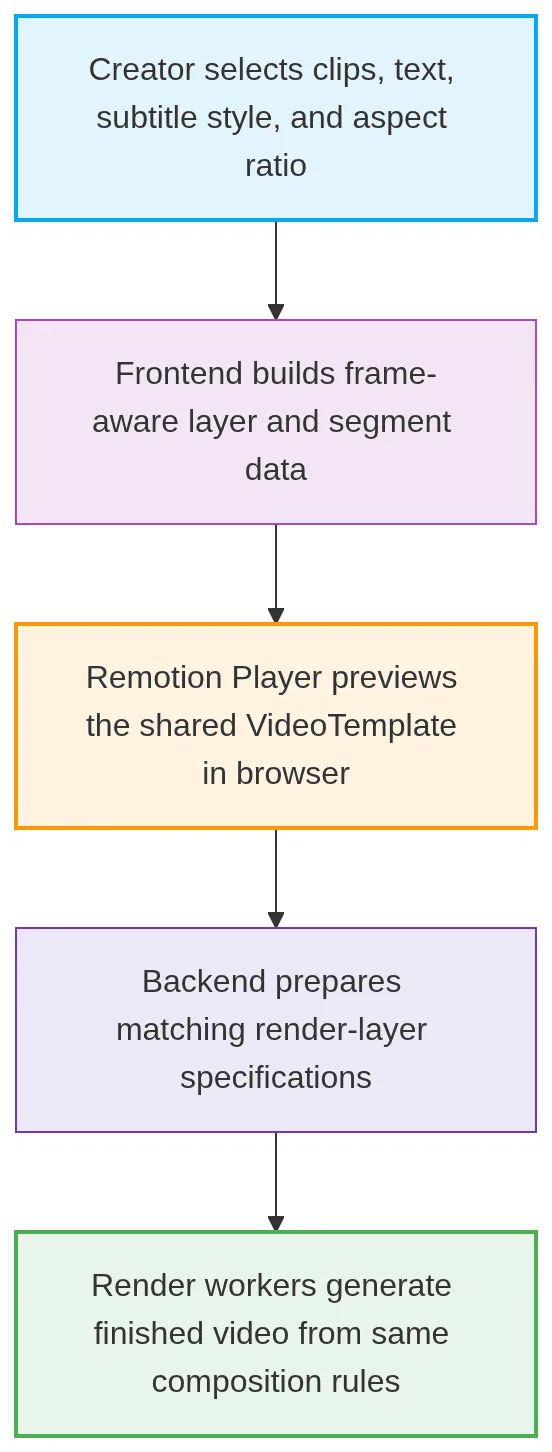
Ang frontend at rendering path ay nagshe-share ng template, fonts, subtitle-style map, at layer types. Ang isang style ay nangangahulugang pareho sa browser at sa isang natapos na ad.
Live previews gamit ang Remotion Player
Ang Remotion Player ay nagbibigay ng interactive preview canvas. Kapag binago ng isang creator ang isang hook, body, CTA, subtitle style, o aspect ratio, ipinapasa namin ang na-update na props sa template sa halip na bumuo ng bagong file.
Ang preview ay gumagamit ng tunay na komposisyon, hindi isang static na approximation. Nagpapakita ito ng sequential clips, timed subtitles, animated text, at napiling canvas dimensions nang magkasama, na may pamilyar na playback controls.
Para sa text editing, pansamantalang tinatago ng preview ang active composition layer habang ang isang on-canvas editor ang humahawak sa interaksyon. Ang nakaimbak na posisyon ay babalik sa Remotion layer na iyon—nang hindi lumilikha ng hiwalay na visual model.
Dynamic layers, na naka-time sa frames
Binibigyan tayo ng Remotion ng frame-based na timeline, kaya ang bawat layer ay may start frame at duration sa halip na isang hindi tumpak na visual guess.
Ang mga timed subtitle words ay pinagsasama-sama sa maiikling chunks at kino-convert sa frames bago maabot ang komposisyon. Bawat hook, body, o CTA ay mayroon ding tinukoy na time window, style, animation, at posisyon. Ang template ay nagre-render lamang ng layer para sa kasalukuyang frame.
Ginagawa nitong isang pagbabago ng data ang isang bagong variation: Nagbibigay ang Adstacker ng ibang layer specification sa parehong component - ang uri ng composable, template-driven na diskarte na inia-apply ng aming mga video technology engineering team sa lahat ng client media pipelines.
Pagdidisenyo para sa tapat na rendered output
Ang browser preview at render worker ay hindi eksaktong nagde-decode ng video sa parehong paraan. Tinitingnan ng aming template kung ito ay nasa rendering mode: sa browser, ginagamit nito ang Video component ng Remotion upang mapatugtog ng Player ang source audio; kapag nagre-render, ginagamit nito ang OffthreadVideo, na mas angkop para sa maaasahang server-side frame extraction.
Nagshe-share din kami ng fonts at style maps sa pagitan ng dalawang konteksto. Pinananatili nito ang pagkakapare-pareho ng subtitle wrapping, text sizing, at animation behavior. Ang isang aspect-ratio canvas at clamped overlays ay pumipigil sa pagkawala ng mga layer sa labas ng gilid.
Halimbawa sa totoong mundo: pagsubok ng isang winning hook nang hindi muling binubuo ang bawat ad
Isipin ang isang brand na may isang product demonstration at dalawang calls to action na sumusubok ng tatlong opening hooks at dalawang subtitle styles. Maaaring i-preview ng creator ang isang kombinasyon, kasama ang pagkakasunod-sunod nito, mga caption, at animated text, sa final ratio.
Kung binago ng team ang hook copy o nilipat ang isang CTA, ia-update nito ang layer data. Walang hiwalay na preview design na muling lilikha; ginagamit ng rendering pipeline ang parehong template rules para sa export.
Maaaring subukan ng mga marketer ang mas maraming ideya habang kinokontrol ang mga detalye na nagpaparamdam na pinakinis ang isang video.
Bumuo, mag-preview, at mag-render nang may kumpiyansa
Tinutulungan ng Remotion ang Adstacker na tratuhin ang mga video ad bilang dynamic, reusable compositions. Ang parehong template ay sumusuporta sa browser exploration at predictable output, habang pinapanatili ng frame-aware layers na naka-sync ang mga subtitle, text, at clips.
Gumawa ng iyong susunod na set ng hooks, captions, at CTAs sa Adstacker, i-preview ang mga kombinasyon habang ikaw ay bumubuo, at i-export ang mga variation na handa nang subukan.
Inia-apply namin ang parehong preview-matches-export na disiplinang ito sa iba pang AI video platform builds, kabilang ang short-form editing tools ng Ssemble at AI-driven generation pipeline ng VideoCap, parehong naka-scale sa render infrastructure na pinamamahalaan sa pamamagitan ng aming cloud infrastructure services.
Technology stack: React · Next.js · Remotion · @remotion/player · AWS ECS render workers · FFmpeg
Basahin pa mula sa aming team
1. Export Service vs. Video Editor Pipeline