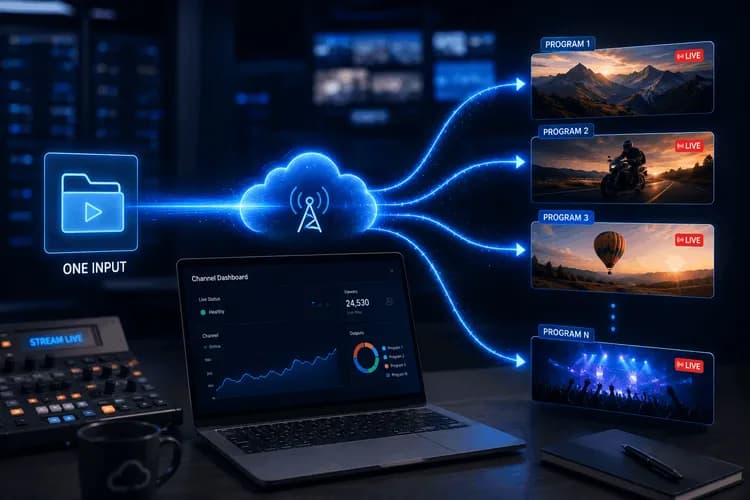
Один вхід, сотні програм — запуск FAST-каналів 24/7 на MediaLive
FAST-канал 24/7 відтворює сотні унікальних програм на день, щодня, безперервно. AWS MediaLive обмежує канал 20 входами (input attachments). Наївний дизайн — один вхід на відео — вичерпує слоти ще до обіду і вимагає перезапуску каналу, що призводить до відключення прямого ефіру. Ми вирішили це за допомогою одного динамічного входу, який обслуговує кожну програму, що коли-небудь буде відтворена на каналі, та шару програмної оркестрації зверху, що забезпечує самовідновлення часової шкали після розгортань (deploys), часткових збоїв та редагувань оператором.
Це інженерна розповідь про те, як насправді працює ця оркестрація.
Короткий огляд
| Аспект | Деталь |
|---|---|
| Домен | Оркестрація FAST-каналу 24/7 на AWS MediaLive |
| Прикріплення вхідних потоків на канал | 1 динамічний + 1 заставка (+ опціональний SRT) — значно менше ліміту в 20 входів |
| Ідентифікація для кожної програми | 8-байтовий шістнадцятковий programId вбудований у назву кожної дії |
| Поріг заповнення заставкою | Проміжки ≥ 6 секунд отримують дію slate-switch |
| Ємність розкладу | 1500 дій на канал (жорсткий ліміт AWS, перевіряється перед виконанням) |
| Самовідновлення | Очищення дій-сиріт виконується після кожного розгортання |
| Статус | У виробництві |
Бізнес-проблема
FAST-канал — це сервіс, що працює 24/7. Оператори заздалегідь планують унікальні відео на цілий тиждень або місяць, і канал повинен відтворювати кожне з них у потрібну секунду — чисто перемикати джерела, стабільно тримати водяний знак (watermark), видавати сигнали для рекламних пауз (ad-break cues), заповнювати будь-які проміжки фірмовою заставкою (slate). Глядач ніколи не повинен бачити чорний екран, завислий логотип або зациклену програму минулого тижня.
Ця оркестрація повинна витримувати все, що з нею роблять оператори: редагування завтрашнього розкладу, додавання рекламних пауз (ad breaks) в середині тижня, повторне розгортання (redeploying) після однієї невдалої програми, поспішні подвійні кліки Deploy. Система або атомарно застосовує кожну зміну до поточного каналу, або чисто відновлюється. "Канал тепер у стані, який ніхто не розуміє" — неприпустимий результат для інфраструктури, яка веде пряму трансляцію.
Короткий вступ до MediaLive за 60 секунд
AWS MediaLive — це довготривалий хмарний кодер. Ви надаєте йому один або кілька входів (вихідні потоки або URL-адреси файлів) та розклад (schedule) із запланованими діями (actions) — перемкнутися на цей вхід, увімкнути це накладання (overlay), вставити цей сигнал (cue). Кодер працює постійно, виконуючи дії у запланований час і генеруючи HLS-маніфест, який споживає плеєр глядача.
Два обмеження AWS формують усе подальше:
- 20 прикріплень вхідних потоків на канал. Жорстке обмеження. Канал "Топ-20 фільмів", наївно розроблений з одним входом на відео, заповнює ліміт на 21-му фільмі.
- 1500 запланованих дій на канал. Також жорстке обмеження. Кожна програма складається з кількох дій (перемикання входу, водяний знак на кожну версію (rendition), рекламні сигнали, перемикання заставки), тому реальна межа ближче до кількох сотень програм одночасно.
Обидва обмеження важливі для каналу 24/7, який, як очікується, відтворюватиме унікальний контент необмежений час.
Чому наївні підходи не працюють
Очевидні шляхи ламаються по-різному:
- "Один вхід на програму." Заповнює ліміт у 20 прикріплень за перший день. Додавання більшої кількості вимагає перестворення каналу — а перестворення каналу займає 60–90 секунд, протягом яких прямий ефір відсутній. Неприйнятно для сервісу 24/7.
- "Перестворювати канал для кожного розгортання (deploy)." Та ж проблема, при кожному розгортанні. Глядачі відчувають перебої щоразу, коли змінюється програма. Це не є реальним варіантом для каналу, який має бути в прямому ефірі.
- "Попередньо кодувати весь тиждень в один гігантський зациклений файл." Знищує модель редагування. Хочете перевпорядкувати завтрашній день? Перекодуйте весь тиждень. Хочете вставити рекламу? Перекодуйте. Вся причина успіху FAST-каналів як бізнесу — це динамічне програмування та вставка реклами в кожен блок — запис усього в один файл унеможливлює обидва ці аспекти.
- "Запуск кількох каналів паралельно." Вимагає перемикання плеєра між ними, збільшує вартість AWS і порушує аудіо, MediaPackage та CDN-пайплайн. Це не стільки вирішує проблему, скільки її примножує.
Важелем, який ми мали, була єдина функція, задокументована AWS — плейсхолдер $urlPath$ на динамічному вході — і свобода будувати будь-яку оркестрацію, яку ми хотіли, поверх нього.
Чому це важливо. Фокус не в використанні $urlPath$. AWS це документує. Фокус полягає в створенні самовідновлюваного шару оркестрації поверх нього, який витримує часткові розгортання (deploys), редагування операторами та одночасні повторні спроби — ніколи не переводячи живий канал у стан, який ніхто не може описати з UI.
Наше рішення
Один канал MediaLive. Один динамічний вхід, пов'язаний з точним URL $urlPath$. Один вхід для заставки (slate input) для заповнення проміжків. На кожній межі програми дія InputSwitchScheduleActionSettings перевизначає URL динамічного входу фактичним S3-шляхом цієї програми. Канал ніколи не потребує нового прикріплення входу (input attachment), ніколи не потребує перезапуску, ніколи не переходить в офлайн.
Цікава робота — це шар оркестрації, який працює поверх цього одного входу — іменуючи кожну дію з ID програми, щоб "сироти" могли бути очищені після збою, заповнюючи проміжки ≥ 6 секунд заставкою, щоб глядач ніколи не бачив застиглого кадру, активуючи водяний знак через виміряний момент після кожного перемикання входу, щоб накладання не мерехтіло через кадри буферизації, та виконуючи попередню перевірку (preflighting) щодо межі 1500 дій, щоб розгортання (deploys) завершувалися з помилкою в UI замість того, щоб зависати в процесі на AWS.
Діаграма 1 · Архітектура каналу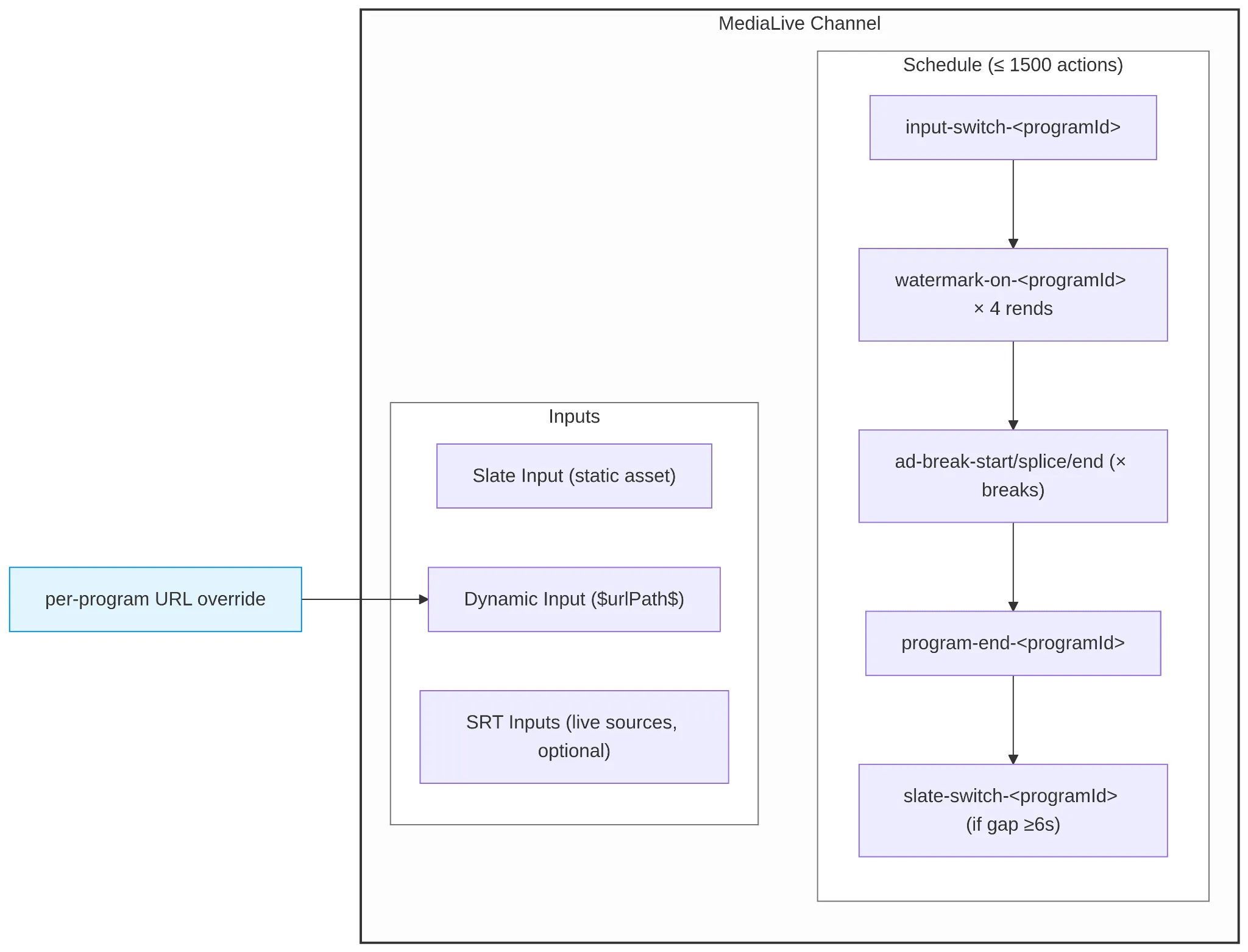
Архітектура
- Вхід для заставки (Slate input) — статичний ресурс, прикріплений до каналу для заповнення проміжків між програмами.
- Динамічний вхід (Dynamic input) — створюється один раз за допомогою Sources: [{ Url: "$urlPath$" }], Type: MP4_FILE. URL є плейсхолдером; фактичний шлях надається для кожної програми під час планування.
- Лямбда-оркестратор (Lambda orchestrator) (fastChannel-lambda-fun/index.js) — керує кожною активністю, яка з'являється на каналі. Генерує 8-байтовий шістнадцятковий programId для кожної програми і позначає ним кожну пов'язану дію.
- Розклад MediaLive (MediaLive schedule) — єдиний впорядкований список дій, усі проходять через одну BatchUpdateScheduleCommand. Обмежено 1500 діями з боку AWS.
- Перевірка бекенду (Backend preflight) (schedule.service.ts) — викликає GET_SCHEDULE_COUNT у Lambda перед кожним розгортанням (deploy) і відмовляється продовжувати, якщо нові дії перевищать ліміт.
Очищення сиріт (Orphan sweep) (sweepIncompleteProgramGroups) — запускається після кожного розгортання. Групує дії за programId, видаляє будь-яку групу, якій бракує її основної дії input-switch.
Ключові інженерні рішення
1. Один динамічний вхід, одне перевизначення URL на програму
Динамічний вхід створюється за допомогою Sources: [{ Url: "$urlPath$" }]. На кожній межі програми Lambda видає дію InputSwitchScheduleActionSettings, яка надає UrlPath: [program.videoUrl] — фактичний S3 URL MP4-файлу цієї програми. MediaLive підставляє плейсхолдер під час виконання і отримує дані з реального джерела.
Один вхідний пристрій тепер обслуговує кожну програму, яку канал коли-небудь відтворюватиме — фактично необмежену кількість унікальних відео протягом усього терміну служби каналу, обмежену лише лімітом запланованих дій на одне розгортання (deploy) у будь-який момент часу. Обмеження у 20 входів перестає бути стримуючим фактором, і каналу ніколи не потрібен перезапуск для додавання нового контенту.
Діаграма 2 · Перевизначення URL динамічного входу

Компроміс, на який ми свідомо пішли. Динамічний вхід не виконує попередню перевірку URL — MediaLive розпізнає плейсхолдер лише під час перемикання, тому помилка 404 виникає як помилка на стороні потоку, а не як відмова під час розгортання (deploy-time rejection). Ми приймаємо цю ціну в обмін на архітектурну простоту одного входу. Окрема валідація ffprobe на бекенді виявляє неправильно сформовані джерела перед розгортанням (deploy).
2. Імена дій, позначені програмами, забезпечують самовідновлення
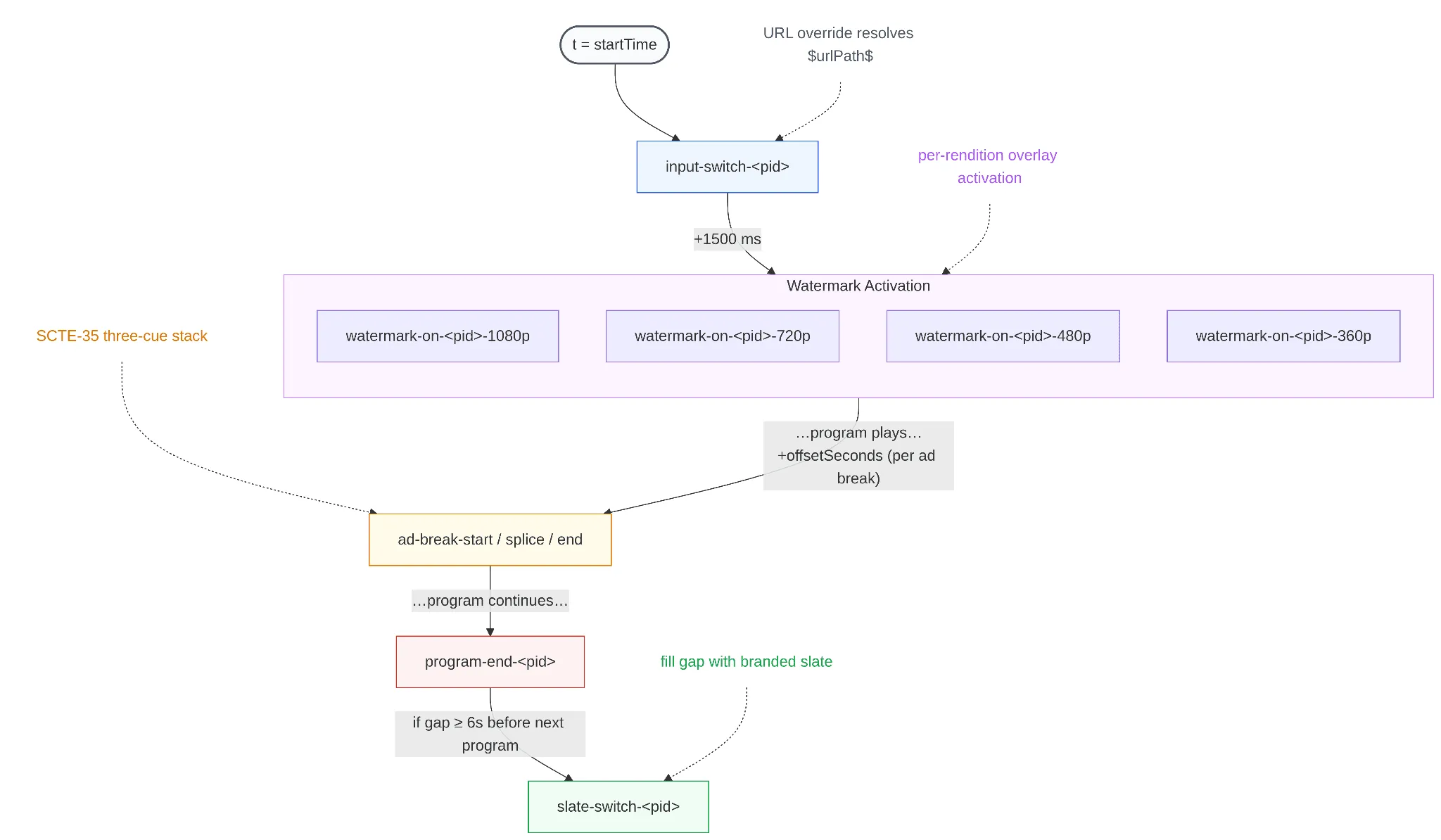
Кожна дія, що випускається Lambda, несе 8-байтовий шістнадцятковий programId програми у своїй назві: input-switch-${programId}, watermark-on-${programId}-${rendition}, ad-break-start-${programId}-${i}, program-end-${programId}, slate-switch-${programId}.
Після кожного розгортання (deploy) sweepIncompleteProgramGroups перераховує всі дії, що зараз є на каналі, групує їх за вбудованим programId і видаляє будь-яку групу, якій бракує її основної дії input-switch. Це шлях очищення для невдалих часткових розгортань, конкурентних редагувань та будь-яких інших умов, які можуть залишити канал із половиною дій програми.
Кодування назви дії — це весь механізм ідентифікації. MediaLive сам по собі не має поняття "програми" — шар оркестрації проєктує його на нього за допомогою конвенцій іменування.
Чому це важливо. Без ID програми, вбудованого в назву кожної дії, очищення сиріт не знало б, які дії належать до однієї групи. Очищення на рівні дій або видалило б занадто багато (повне скидання каналу), або занадто мало (залишені водяні знаки, які ніколи не вимикаються). Конвенція іменування і є моделлю даних.
3. Правило заставки 6 секунд
Програми рідко стикаються ідеально — майже завжди є проміжок у кілька секунд між кінцем одного MP4 та початком наступної запланованої програми. Оркестрація видає дію slate-switch, коли цей проміжок становить ≥ 6 секунд (MIN_SLATE_GAP_MS = 6000).
Поріг не є довільним. MediaLive вимагає мінімальний інтервал у 5 секунд між будь-якими двома запланованими діями; видача дії slate-switch ближче до перемикання входу наступної програми призводить до відмови. Правило 6 секунд дає MediaLive необхідний інтервал і залишає шару оркестрації односекундний запас безпеки від дрейфу часу. При інтервалі менше 6 секунд ми дозволяємо останньому кадру попередньої програми короткочасно застигнути, замість того, щоб ризикувати відмовою у розгортанні (deploy).
4. Водяний знак на кожну версію з виміряною затримкою активації
Водяний знак — це дія StaticImageOutputActivate, що випускається для кожної вихідної версії (rendition) (1080p, 720p, 480p, 360p) — чотири дії на програму. Кожна дія запускається через 1500 мс після перемикання входу цієї програми.
Затримка існує тому, що перші кадри після перемикання входу все ще буферизуються; активація накладання (overlay) в момент точного перемикання може спричинити короткочасне мерехтіння, оскільки накладання відображається на ще не повністю відрендереному кадрі. 1500 мс — це значення, яке під час тестування послідовно забезпечувало чисту активацію на всіх чотирьох версіях. Це виміряна константа, а не задокументований параметр MediaLive — і вона знаходиться в одному місці в коді, тому майбутнє налаштування потребує лише зміни одного рядка.
Компроміс, на який ми свідомо пішли. Дії накладання (overlay) для кожної версії коштують у 4 рази більше дій, ніж одне глобальне накладання. Ми приймаємо ці витрати, оскільки шлях для кожної версії дозволяє кожному виходу отримати водяний знак, точно підібраний під його розміри в пікселях, замість того, щоб MediaLive зменшував одне накладання для всіх чотирьох. Результатом є помітно чіткіший логотип на SD-виходах — і це залишає достатньо бюджету дій для сотень програм, перш ніж ліміт у 1500 стане проблемою.
5. Межа в 1500 дій, перевірена перед виконанням в UI
AWS жорстко обмежує канал MediaLive 1500 запланованими діями. З приблизно 7–8 діями на програму (перемикання входу + 4 водяні знаки + 2 рекламні сигнали + випадкова заставка), канал утримує приблизно 180–200 активних програм, залежно від щільності реклами та частоти заставок. Це реальна межа для довгострокових розгортань (deploys), і точне число залежить від складності кожної програми.
Перед кожним розгортанням (deploy) бекенд викликає GET_SCHEDULE_COUNT Lambda, яка підраховує активні дії на каналі за допомогою DescribeScheduleCommand і повертає { liveCount, capacity: 1500 }. Якщо liveCount + (newPrograms × 8) перевищить 1500, бекенд видає помилку SCHEDULE_ACTION_CAP_EXCEEDED із точним числом доступного ліміту — перш ніж він щось надсилає до MediaLive. Оператор бачить ліміт в UI з вказівкою спочатку видалити минулі програми. Розгортання ніколи не "врізається в стіну" на півдорозі.
Діаграма 3 · Хронологія дій однієї програми
Результати
- Один канал MediaLive обслуговує ефективно необмежену кількість унікальних програм протягом свого життєвого циклу за допомогою одного динамічного вхідного прикріплення. Обмеження в 20 входів більше не є стримуючим фактором, який ми повинні враховувати — ємність у будь-який момент часу регулюється лімітом запланованих дій, а не лімітом входів.
- Оркестрація каналу є самовідновлюваною: кожне розгортання (deploy) завершується очищенням "сиріт", тому невдалі часткові розгортання не можуть залишити розклад у непослідовному стані.
- Ємність розкладу обмежена і видима. Оператори бачать межу в 1500 дій в UI до того, як натиснуть, а не як непрозору відмову AWS під час розгортання.
- Конвенція іменування з ID програми є цілим шаром ідентифікації — і це рядок. Ніякої нової інфраструктури, ніякого додаткового сховища, ніяких залежностей. Найпростіша можлива проєкція "програми" на плоский список дій MediaLive.
Стек технологій: AWS MediaLive · AWS Lambda · NestJS · MongoDB · TypeScript · Node 18 · AWS SDK v3 (@aws-sdk/client-medialive)