Back to Architecture Patterns

InfrastructureAdvanced

On-Off Scaling Architecture

Don't pay for idle GPUs. Provision compute just-in-time, process the workload, and tear it down — turning capital expense into a per-job operating cost.

|
2 topics covered
Discuss This Architecture
on-off-scaling-architecture.webp
Infrastructure
Category
Advanced
Complexity
AI/ML, Media & Entertainment
Industries
2+
Technologies

When You Need This

Your workload is bursty — video encoding jobs that spike when content is uploaded, ML training runs that need 8 GPUs for 4 hours then nothing, batch inference jobs triggered by business events, or rendering pipelines that run overnight. You're either over-provisioned (paying for idle resources 80% of the time) or under-provisioned (jobs queue for hours during peaks). You need an architecture that provisions exactly the compute you need, when you need it, and releases it when the job completes — without the cold-start penalty that makes "scale to zero" impractical for GPU workloads.

Pattern Overview

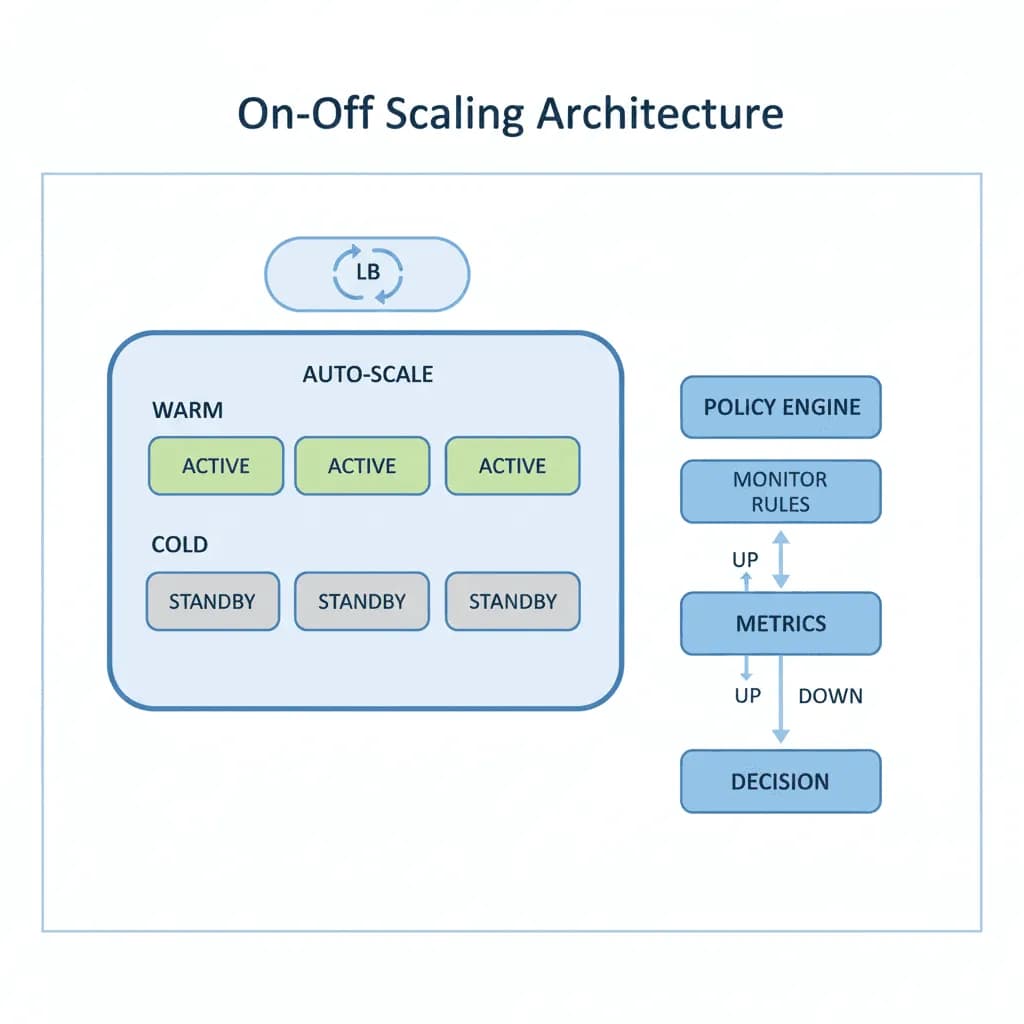
On-off scaling architecture manages compute resources through warm/cold pooling, job-queue-driven provisioning, and automated teardown. A warm pool maintains a small number of pre-initialized instances ready for immediate use. A cold pool provisions additional capacity from spot/preemptible instances when demand exceeds the warm pool. A job orchestrator routes work to available instances, monitors progress, handles retries on spot eviction, and triggers scale-down when the queue drains. The pattern is particularly critical for GPU workloads where cold start (container pull + model loading) can take 3-10 minutes.

Reference Architecture

The system centers on a job queue (SQS, Redis, or custom) that buffers incoming work requests. A scaling controller monitors queue depth and provisions instances from the warm pool first, then from the cold pool (spot instances). Each worker instance pulls jobs from the queue, executes the workload (encoding, training, inference), reports completion, and returns to the pool or terminates. A checkpoint manager handles spot eviction by saving intermediate state to S3, enabling jobs to resume on a different instance without starting over.

Core Components
  • Job Queue & Scheduler: Prioritized job queue with configurable concurrency limits per job type. Supports delayed execution, dead-letter queues for failed jobs, and priority lanes (express jobs get warm pool instances, standard jobs use cold pool). AWS SQS, BullMQ on Redis, or Temporal for complex workflows
  • Warm Pool Manager: Maintains N pre-initialized instances with models loaded in GPU memory, containers running, and health checks passing. Instances cycle through: idle → assigned → processing → idle. Pool size is configurable by time-of-day (larger during business hours, smaller overnight) and adjustable based on historical demand patterns
  • Cold Pool Provisioner: Provisions additional capacity from spot instances (AWS), preemptible VMs (GCP), or serverless GPU providers (RunPod, Modal, Salad). Handles spot interruption notifications by migrating jobs to available instances. Uses a diversified instance type strategy (multiple GPU types, multiple AZs) to maximize spot availability
  • Checkpoint & Recovery: For long-running jobs (ML training, large video encoding), periodic checkpointing saves intermediate state to S3. On spot eviction, the job is re-queued and resumes from the last checkpoint. For short jobs (< 10 min), the cost of checkpointing exceeds the cost of restart — these jobs simply retry from scratch

Design Decisions & Trade-offs

Warm Pool Size
The warm pool is a trade-off between cost (paying for idle instances) and latency (cold start time for the first job). MW sizes warm pools based on queue arrival patterns: if jobs arrive continuously during business hours, the warm pool covers the average throughput; cold pool covers peaks. If jobs arrive in unpredictable bursts, we keep a smaller warm pool and accept cold-start latency for the first burst jobs while the cold pool provisions.
Spot Instances vs. Serverless GPU (RunPod/Modal)
Spot instances are cheaper per-hour but require you to manage provisioning, eviction handling, and instance lifecycle. Serverless GPU providers (RunPod Serverless, Modal, Banana) handle provisioning and offer per-second billing but at a higher per-compute-second rate. MW uses spot instances for predictable, long-running workloads (>30 min) and serverless GPU for short, bursty jobs (<10 min) where provisioning overhead would dominate.
Scale-Down Aggressiveness
Scale down too fast and you pay cold-start penalties when the next job arrives. Scale down too slow and you pay for idle instances. MW implements a "cooldown with decay" strategy: after the queue drains, instances remain warm for a configurable period (default: 10 minutes). If no new jobs arrive, instances scale down progressively (50% at 10 min, remaining at 30 min). The cooldown period is tunable and auto-adjusts based on inter-arrival time statistics.
GPU Model Loading Optimization
For ML inference, the cold-start bottleneck is often model loading (downloading from S3 + loading into GPU memory), not container startup. MW optimizes this by: (a) pre-baking models into container images (for small models), (b) using shared NVMe storage across instances with model caching (for large models), and (c) keeping warm pool instances with models pre-loaded in GPU memory.
On-Off Scaling Architecture - System Architecture Diagram

System Architecture Overview

Technology Choices

LayerTechnologies
ComputeAWS EC2 Spot (G5/P4), GCP Preemptible (A2/L4), RunPod Serverless, Modal
OrchestrationKubernetes (Karpenter for autoscaling), AWS Batch, custom job orchestrator
Job QueueAWS SQS, BullMQ (Redis), Temporal, Celery
StorageS3 (checkpoints, model artifacts), NVMe (model cache), EFS (shared workspace)
MonitoringCloudWatch/Prometheus (queue depth, instance utilization, job latency), custom cost dashboards

When to Use / When to Avoid

Use WhenAvoid When
Workload is bursty — peak demand is 5x+ average demandTraffic is steady and predictable — right-sized reserved instances are cheaper
GPU/high-compute jobs that are expensive when idleThe workload is lightweight CPU processing that fits serverless (Lambda)
Jobs can tolerate 1-5 minute cold start for cold pool provisioningSub-second job start latency is required — you need always-on infrastructure
Cost optimization is a primary concern and spot pricing offers 60-90% savingsSpot interruption would cause data loss that checkpointing can't mitigate

Our Approach

MW designs on-off scaling with a "cost per job" lens — we model the total cost of processing one unit of work (one video, one training run, one batch inference) across different scaling strategies and pick the one that minimizes cost at the required latency SLA. Our implementations include real-time cost dashboards that show per-job cost, infrastructure utilization, and spot savings. We've built on-off GPU infrastructure that reduced video processing costs by 70% compared to reserved instances, and ML training clusters that provision 64 GPUs for a 4-hour training run and release them automatically.

Related Blueprints

Related Case Studies

Related Technologies
Cloud SolutionsAI Development

Frequently Asked Questions

MicrocosmWorks clients with batch-heavy or periodic workloads typically see 60-80% cloud cost reductions after implementing on-off scaling, because compute resources only run during active processing windows instead of 24/7. We design scaling policies based on actual usage telemetry—for example, a data processing pipeline that runs for 4 hours daily only pays for those 4 hours instead of the full 24. Our architects analyze your workload patterns during a discovery phase to project exact savings before any implementation begins.

Cold-start times vary from 2-3 seconds for containerized applications on pre-warmed node pools to 5-10 minutes for workloads requiring specialized GPU instances or large model loading, and MicrocosmWorks uses several techniques to minimize this delay. We implement predictive scaling that spins up resources before anticipated demand using historical traffic patterns and scheduled events, and we use container image pre-pulling and warm pool reservations for latency-sensitive workloads. For applications that cannot tolerate any cold start, we maintain a minimal warm baseline that scales up aggressively when demand arrives.

MicrocosmWorks implements reactive auto-scaling with aggressive scale-up policies triggered by queue depth, CPU utilization, or custom application metrics, combined with more gradual scale-down policies that include cooldown periods to avoid thrashing. We configure over-provisioning buffers during scale-up events so the system anticipates continued growth rather than chasing demand one instance at a time. For truly unpredictable spikes like flash sales or viral events, we pre-provision capacity using event-driven triggers from your marketing or operations calendar.

MicrocosmWorks applies on-off scaling to databases using serverless database offerings like Aurora Serverless, Neon, or PlanetScale that scale compute to zero during idle periods while keeping storage persistent and instantly available. For stateful workloads that cannot use serverless databases, we implement read-replica scaling that adds and removes replicas based on query load while keeping a minimal primary instance always running. This hybrid approach gives clients the cost benefits of scaling for their data tier without the complexity of managing database state during shutdown and restart cycles.

MicrocosmWorks deploys comprehensive scaling observability that tracks instance counts, scaling event latency, failed scaling attempts, and the gap between desired and actual capacity in real time using Grafana or Datadog dashboards. We configure multi-channel alerts for scaling failures, sustained high utilization that suggests the scaling ceiling is too low, and cost anomalies that indicate runaway scaling. Our runbooks include automated remediation for common failure modes like hitting cloud provider instance limits or encountering insufficient capacity errors in specific availability zones.

Need Help Implementing This Architecture?

Our architects can help design and build systems using this pattern for your specific requirements.

Get In Touch


Contact UsSchedule Appointment