
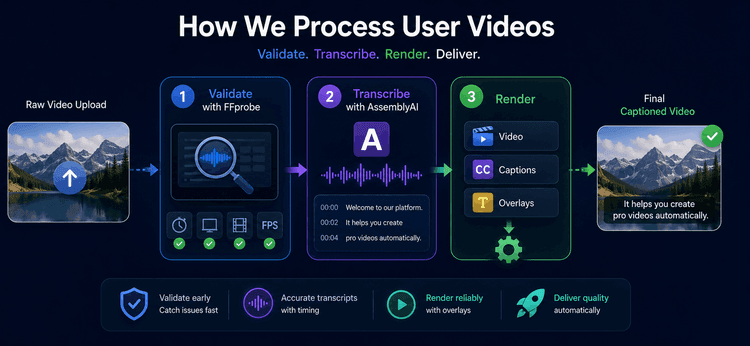
A user uploads a raw video and, a few moments later, gets back a fully captioned, overlay-ready file — no manual editing, no back-and-forth. Getting from one to the other reliably, at scale, across every video a user might throw at the system, is the actual engineering problem. It comes down to three tools doing one job each, in a strict order: FFprobe validates, AssemblyAI transcribes, and a rendering stage combines everything into the final output.
Upload → FFprobe Validation → AssemblyAI Transcription → Captions & Overlays → Rendering → Final Video
1. Video Validation with FFprobe
Every upload is checked before it's allowed anywhere near the processing pipeline. We use FFprobe, part of the FFmpeg suite, to read the file's metadata rather than trusting the upload blindly.
What gets checked:
- Video duration
- Resolution
- Streams of audio and video
- Details of the file
- Frame rate
If the file passes, it moves forward. If it fails any check, the user gets an error back immediately rather than watching a video silently disappear into a failed render ten minutes later. This is the point of validating early: it's far cheaper to reject a bad file in a few hundred milliseconds than to discover the problem after transcription and rendering have already spent time and compute on it.
2. Transcription with AssemblyAI
Once a video is validated, its audio is extracted and sent to AssemblyAI, which converts speech into text and returns timing data alongside it — the kind of AI-powered processing work we build into client pipelines regularly.
That timing data is the part that matters most here — it's what lets captions land in sync with the words being spoken rather than drifting a beat behind, which is the difference between captions that feel automatic and captions that feel obviously bolted on. The transcript itself is stored and passed downstream to the caption and overlay stage.
Validated Video → Audio → AssemblyAI → Transcript (with timing) → Captions
This removes manual transcription entirely from the workflow, and because the timing comes from AssemblyAI directly rather than being estimated after the fact, captions stay synchronized without any separate alignment step.
3. Rendering
With a validated video and a timed transcript in hand, the final stage combines everything: the source video, generated captions, and any configured text or visual overlays.
Source Video + Captions + Overlays → Rendering → Final Video
During rendering, each element is applied at its correct timestamp, the video is processed as a whole, and the output is stored and made available to the user. This is the same principle we've written about before when it comes to video and caption rendering — the render should be a mechanical, predictable step, not a place where new bugs get introduced, because all the actual decisions (what to check, what to transcribe, what to overlay) have already been made in the stages before it.
Why the Three-Stage Split Works
| Component | Responsibility |
| FFprobe | Validates the file before any real work begins |
| AssemblyAI | Converts speech to text and supplies caption timing |
| Rendering engine | Applies captions and overlays to produce the final video |
Keeping these responsibilities separate means each stage fails independently and predictably. A bad upload gets caught at FFprobe, not three stages later. A transcription hiccup doesn't corrupt validation logic. And rendering never has to guess at data it should have already received cleanly from the stages before it. That separation is what makes the pipeline maintainable as more overlay types, output formats, or validation rules get added over time — the same principle behind the video and AI-driven projects in our portfolio.
The Complete Flow
Upload → Validate (FFprobe) → Transcribe (AssemblyAI) → Generate Captions & Prepare Overlays → Render → Store → Deliver
Three tools, each doing exactly one job, in a fixed order — that's the whole system. Automating it this way removes manual transcription, catches bad uploads before they waste processing time, and keeps captions synchronized without extra alignment work, all while staying straightforward to extend as requirements grow.
Building a pipeline that needs to validate, transcribe, and render video reliably at scale? This is the kind of media infrastructure work we do regularly for clients. Talk to our engineering team →