MicrocosmWorks디지털 코스모스 혁신 및 설계
소개연락처
MicrocosmWorks디지털 코스모스를 혁신하고 설계합니다

중요한 IT 솔루션을 제공합니다. 기술, 보안에 열정적이며 신뢰할 수 있는 혁신적인 IT 인프라를 통해 비즈니스 성장을 돕습니다.

[email protected]
+91 7011868196
New Delhi, India

AI 성장 허브

AI 허브스타트업 혁신기업 가속기

솔루션

모든 솔루션웰니스 및 피트니스 앱AI 비디오 플랫폼AI 에이전트 개발

자원

통찰력산업 가이드사용 사례 청사진아키텍처 패턴사례 연구

회사

회사 소개연락처우리의 작업

서비스

디지털 컨설팅클라우드 인프라SaaS 개발AI 개발비디오 기술
ERP 개발Zoho 맞춤화Odoo 개발Salesforce 통합맞춤형 CRM 개발
QuickBooks 통합IoT 솔루션블록체인 개발
사이버 보안 컨설팅IT 지원 - L3

© 2026 MicrocosmWorks. 모든 권리 보유.

개인정보 처리방침서비스 약관
통찰로 돌아가기
SaaS Applications

Syncing Apple Health & Health Connect

Apple HealthKit and Android Health Connect agree on almost nothing — different read models, permission schemes, and data shapes. Here's how we built a three-layer sync architecture that normalizes both into one deduplicated, timezone-correct daily health profile, without draining battery or double-counting steps from overlapping devices.

Mayank Joshi.webpMayank Chandra Joshi
•
August 12, 2026
•
수정일 August 12, 2026
•
4 min read
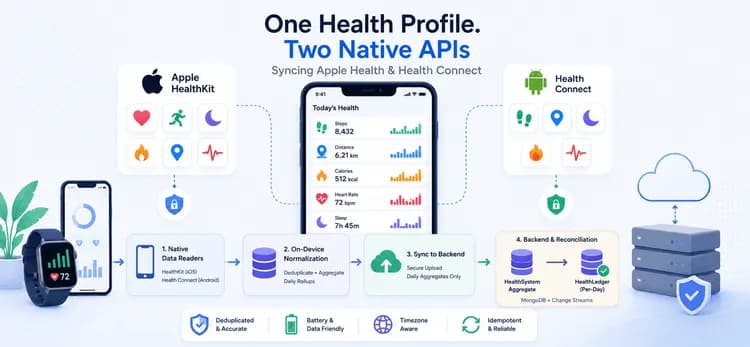
Health data synchronization architecture connecting Apple HealthKit and Android Health Connect to a unified health profile with on-device normalization.
4 min read

Steps, distance, calories, heart rate, and sleep have to be pulled from the user's platform (Android Health Connect on Android, Apple HealthKit on iOS) by a health and nutrition app — and present it as one clean, deduplicated daily profile. There are very few similarities between the two APIs: separate read mechanics, different authorization schemes, and different data structures. We built the mobile sync layer that makes them look like one.


The Challenge

  • Two native APIs that agree on nothing. Apple HealthKit returns daily aggregates through callbacks; Health Connect returns raw, paginated samples with rich source metadata. Same concepts, completely different shapes — and the app had to normalize both into one schema.
  • Double-counting is the default. A phone, a smartwatch, and a third-party app can all report the same 8,000 steps. Naively summing them inflates every metric. The app needed to recognize overlapping sources and count each real-world activity once.
  • Battery and network can't pay for freshness. Health data changes all day, but reading the full history on every sync would drain the battery and saturate cellular connections. The sync cadence had to stay light while still feeling live.
  • Permissions can be confusing. Dozens of data types, two permission models, background-read restrictions, and users who grant some scopes but not others — all of which the app has to handle without crashing the flow.


Our Solution

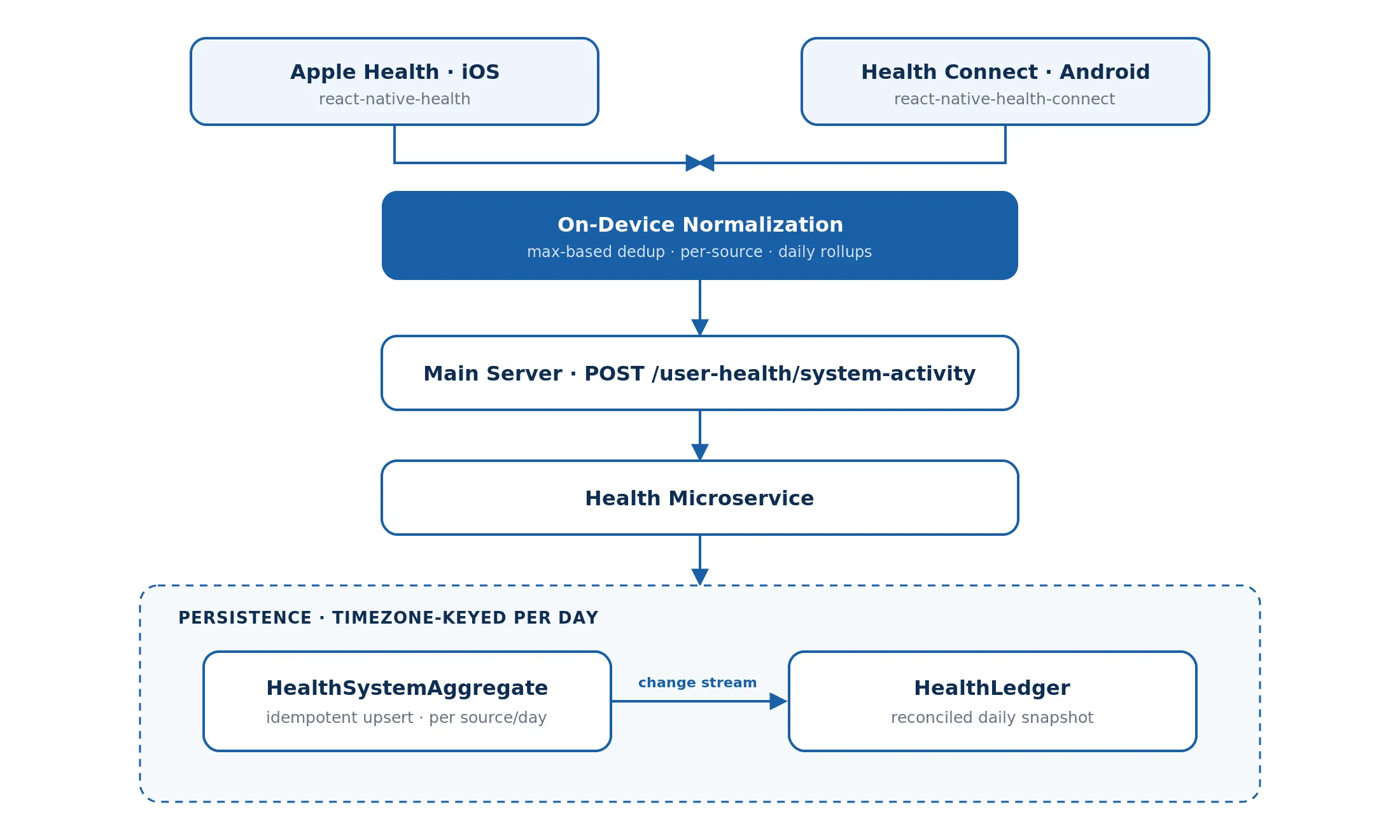
We built a three-layer sync: a thin native layer reads each platform's API, an on-device normalization layer deduplicates and rolls the data into daily summaries, and the backend stores it and reconciles it into a single trusted ledger. The client never ships raw samples — it ships clean, timezone-correct daily rollups.

health-sync-pipeline.webp


Architecture

  • iOS reads Apple HealthKit through react-native-health; Android reads Health Connect through react-native-health-connect.
  • On-device normalization transforms both platforms' output into one schema and deduplicates before anything leaves the phone.
  • Sync triggers — 30 days of history on first launch, then lightweight 1-day incremental reads on a 10-minute interval and on every app resume.
  • Transport — normalized daily rollups are POSTed to the main server's /user-health/system-activity, which forwards them (with user ID + timezone) to the health microservice.
  • Persistence — each source/day is stored idempotently as a HealthSystemAggregate; a MongoDB change stream then reconciles it into a per-day HealthLedger.
  • Expo / React Native managed workflow with native HealthKit and Health Connect modules.


Key Features

  1. One normalization contract for two APIs. Platform-specific readers feed a single formatHealthData step that emits the same shape regardless of source — so the backend and UI never branch on iOS vs Android.

2. Max-based deduplication on the device. Within each source, a day's readings are summed; then the daily value is the Math.max() across sources (calories keyed by source|deviceType), so multiple readings from one device accumulate while a watch and a phone reporting the same day don't double up: 
 

// Sum readings within each source, then take the max ACROSS sources

dateSourceMap[date][source] += entry.count;

const totalSteps = Math.ceil(Math.max(...Object.values(dateSourceMap[date])));

3.The right read strategy per platform. Health Connect reads are paginated with a pageToken loop (1,000 records/page); HealthKit's daily aggregates are looped day-by-day. Each quirk is contained in its own reader, invisible to the rest of the app.

4. A sync cadence that respects the battery. A full 30-day backfill runs only once (guarded by a first-call flag); after that, every sync pulls just one day — fast on cellular, cheap on power.

5. Timezone-correct daily grouping. Samples are bucketed into YYYY-MM-DD keys in the user's own timezone, so a workout at 11 PM lands on the right day no matter where the server lives.

6. Idempotent backend writes. Each rollup upserts on (userId, deviceId, source, date) — re-sending the same day is a no-op, making retries and overlapping syncs safe.

7. Honest degradation. Missing permissions, empty reads, and Health Connect rate-limit errors are caught and surfaced cleanly — an empty day never crashes the sync, and the user gets a clear prompt instead of a silent failure.


Results

  • A single, consistent health profile across iOS and Android — the platform difference is invisible to the rest of the app.
  • Overlapping device/app sources are deduplicated, so steps and calories reflect reality instead of inflated sums.
  • Lightweight incremental syncs keep data fresh without draining battery or burning mobile data.
  • Timezone-correct, idempotent writes mean every metric lands on the right day, and retries never corrupt the record.


Technology Stack

React Native (Expo) · react-native-health (HealthKit) · react-native-health-connect · NestJS · MongoDB · MongoDB Change Streams · moment-timezone

Apple HealthKitAndroid Health ConnectHealth Data SyncMobile App DevelopmentReact Native
Mayank Joshi.webp

저자 소개

Mayank Chandra Joshi

AI & Cloud Solutions Expert at MicrocosmWorks

Building innovative AI-powered solutions and helping businesses transform through cutting-edge technology.

더 자세히 알고 싶으신가요?

비즈니스를 위한 이러한 솔루션 구현 방법에 대해 문의하세요.

연락하기

Comments (0)

Share your thoughts and join the conversation

Leave a Comment

Your email will not be published

No comments yet

Be the first to share your thoughts!