프로젝트를 상담하세요
MicrocosmWorks디지털 코스모스 혁신 및 설계
소개연락처
MicrocosmWorks디지털 코스모스를 혁신하고 설계합니다

중요한 IT 솔루션을 제공합니다. 기술, 보안에 열정적이며 신뢰할 수 있는 혁신적인 IT 인프라를 통해 비즈니스 성장을 돕습니다.

[email protected]
+91 7011868196
New Delhi, India

솔루션

구축AI 제품 엔지니어링SaaS 제품 엔지니어링맞춤형 소프트웨어 개발
현대화소프트웨어 현대화AI 현대화클라우드 앱 현대화
확장백엔드 및 분산 시스템클라우드 성능 엔지니어링신뢰성 및 성능 엔지니어링AI 인프라
확대제품 엔지니어링 팀
모든 솔루션AI 에이전트 개발AI 비디오 플랫폼웰니스 및 피트니스 앱

서비스

디지털 컨설팅클라우드 인프라SaaS 개발AI 개발비디오 기술
ERP 개발Zoho 맞춤화Odoo 개발Salesforce 통합맞춤형 CRM 개발
QuickBooks 통합IoT 솔루션블록체인 개발
사이버 보안 컨설팅IT 지원 - L3

AI 성장 허브

AI 허브스타트업 혁신기업 가속기

자원

통찰력산업 가이드사용 사례 청사진아키텍처 패턴사례 연구

회사

회사 소개연락처프로젝트를 상담하세요우리의 작업

© 2026 MicrocosmWorks. 모든 권리 보유.

개인정보 처리방침서비스 약관
통찰로 돌아가기
AI Development

How We Use Remotion for Dynamic Video Rendering and Preview Generation

Using Remotion to render dynamic, data-driven videos and generate fast previews from React components.

Anup Kumar.webpAnup
•
September 2, 2026
•
수정일 September 2, 2026
•
5 min read
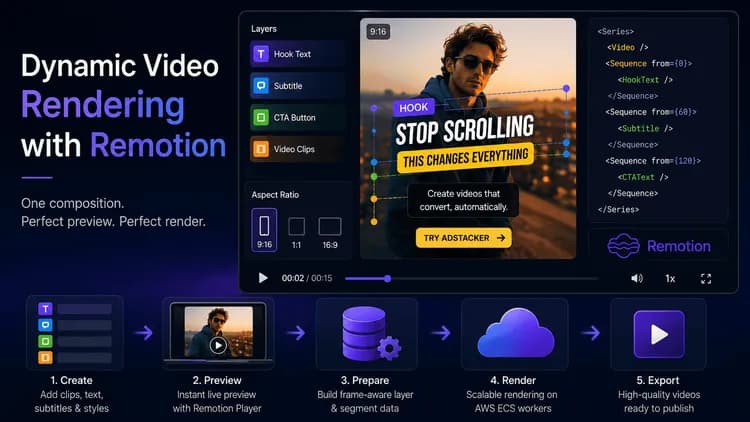
Adstacker dynamic video rendering with Remotion, showing a video editor preview with layered text, subtitles, aspect-ratio controls, and code-driven video composition.
5 min read

At Adstacker, a video ad is a combination of clips, subtitle timing, text layers, styles, animations, aspect ratios, and calls to action. Creators need to see those choices immediately—and the finished export must match.

That is why we use Remotion. Its React-based composition powers editable previews and provides the same visual rules for rendered video. We define the creative once and keep the two experiences aligned.

The challenge: preview and export often drift apart

Creative tools commonly face a frustrating problem: the editor preview looks right, but the exported file does not. A text position may shift, a font may wrap differently, captions may appear at the wrong moment, or a sequence of clips may play differently after export.

The problem grows when users mix segments, choose subtitle styles, add hook/body/CTA text, and change the output aspect ratio. If each surface interprets these settings independently, small differences compound.

Adstacker needs immediate previews and scalable rendering. The composition must be flexible for editing and predictable in production.

One shared composition for preview and rendering

Our central building block is a shared Remotion VideoTemplate. It accepts:

  • One video or a sequence of video segments
  • The total duration and frame rate
  • A target canvas size for the selected aspect ratio
  • Timed text, CTA, and subtitle layers
  • Styling and animation settings for each layer

Remotion’s Series chains segments into one timeline. Sequence places text and subtitle layers at specific frames. A variation is therefore data, not a one-off edited file.

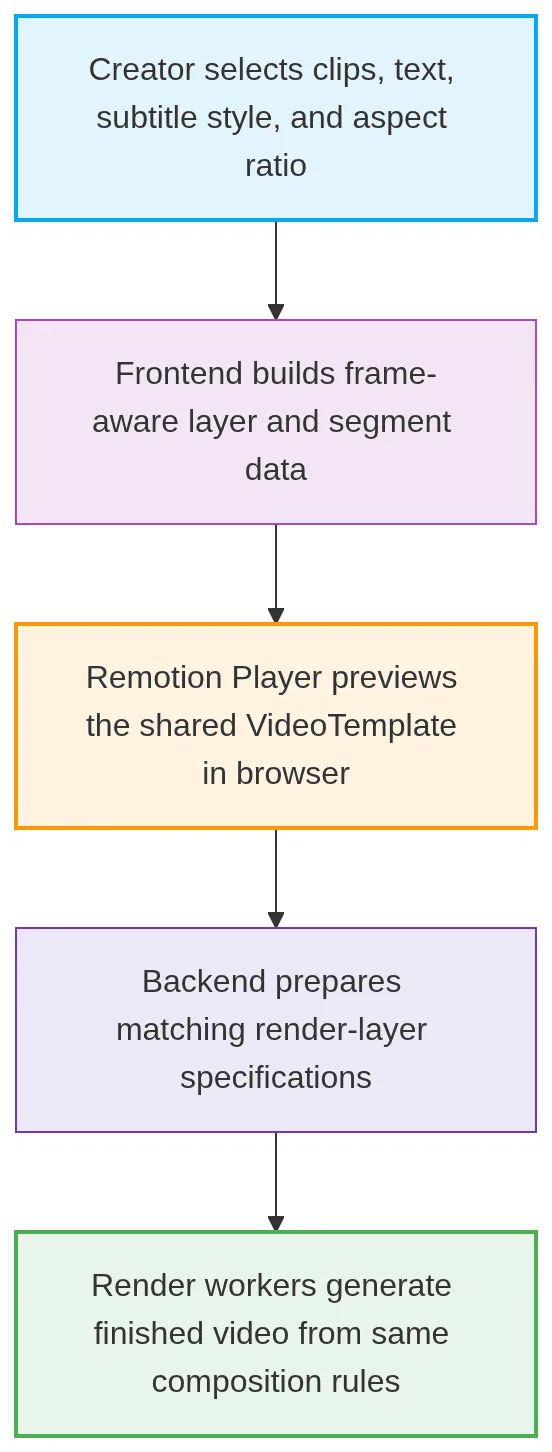
Architecture

mermaid-diagram-2026-09-02-114357.webp

The frontend and rendering path share the template, fonts, subtitle-style map, and layer types. A style means the same thing in the browser and in a finished ad.

Live previews with the Remotion Player

The Remotion Player provides the interactive preview canvas. When a creator changes a hook, body, CTA, subtitle style, or aspect ratio, we pass updated props to the template instead of building a new file.

The preview uses the real composition, not a static approximation. It shows sequential clips, timed subtitles, animated text, and selected canvas dimensions together, with familiar playback controls.

For text editing, the preview temporarily hides the active composition layer while an on-canvas editor handles interaction. The stored position then flows back into that Remotion layer—without creating a separate visual model.

Dynamic layers, timed to frames

Remotion gives us a frame-based timeline, so every layer has a start frame and duration rather than an imprecise visual guess.

Timed subtitle words are grouped into short chunks and converted into frames before reaching the composition. Each hook, body, or CTA likewise has a defined time window, style, animation, and position. The template renders only the layer for the current frame.

This makes a new variation a data change: Adstacker supplies a different layer specification to the same component - the kind of composable, template-driven approach our video technology engineering teams apply across client media pipelines.

Designing for a faithful rendered output

A browser preview and a render worker do not decode video in exactly the same way. Our template checks whether it is in rendering mode: in the browser, it uses Remotion’s Video component so the Player can play the source audio; when rendering, it uses OffthreadVideo, which is better suited to dependable server-side frame extraction.

We also share fonts and style maps between the two contexts. This keeps subtitle wrapping, text sizing, and animation behavior consistent. An aspect-ratio canvas and clamped overlays prevent layers from disappearing beyond the edge.

Real-world example: testing a winning hook without rebuilding every ad

Imagine a brand with one product demonstration and two calls to action testing three opening hooks and two subtitle styles. The creator can preview a combination, including its sequence, captions, and animated text, in the final ratio.

If the team changes hook copy or moves a CTA, it updates the layer data. There is no separate preview design to recreate; the rendering pipeline uses the same template rules for export.

Marketers can test more ideas while controlling the details that make a video feel polished.

Build, preview, and render with confidence

Remotion helps Adstacker treat video ads as dynamic, reusable compositions. The same template supports browser exploration and predictable output, while frame-aware layers keep subtitles, text, and clips in sync.

Create your next set of hooks, captions, and CTAs in Adstacker, preview the combinations as you build, and export the variations that are ready to test.

We’ve applied this same preview-matches-export discipline on other AI video platform builds, including Ssemble’s short-form editing tools and VideoCap’s AI-driven generation pipeline, both scaled on render infrastructure managed through our cloud infrastructure services.


Technology stack: React · Next.js · Remotion · @remotion/player · AWS ECS render workers · FFmpeg


Read more from our team

1. Export Service vs. Video Editor Pipeline

2. Building a Normal Video Editor

3. Optimizing Channel Logo for Different Video Resolutions
 

RemotionReactRenderingVideo
Anup Kumar.webp

저자 소개

Anup

AI & Cloud Solutions Expert at MicrocosmWorks

Building innovative AI-powered solutions and helping businesses transform through cutting-edge technology.

더 자세히 알고 싶으신가요?

비즈니스를 위한 이러한 솔루션 구현 방법에 대해 문의하세요.

연락하기

자주 묻는 질문

Adstacker uses Remotion and a shared React-based VideoTemplate to define video compositions as reusable data-driven components. The same composition rules control clips, subtitles, text layers, animations, aspect ratios, and calls to action across preview and rendering.

Adstacker uses the same Remotion composition, fonts, subtitle-style maps, and layer definitions for both browser previews and rendered videos. This helps keep text positioning, subtitle timing, animations, and styling consistent between what creators see and the final exported video.

Remotion uses a frame-based timeline where subtitles, text, CTAs, and other visual layers are assigned specific start frames and durations. Adstacker converts timed subtitle data into frame-aware chunks so the appropriate layer is rendered at the correct point in the video.

Adstacker treats each video variation as a different set of composition data rather than a completely separate video project. Creators can change clips, hooks, CTAs, subtitle styles, and text layers while reusing the same Remotion template and rendering rules.

Adstacker's rendering pipeline uses React, Next.js, Remotion, @remotion/player, AWS ECS render workers, and FFmpeg. These technologies support interactive browser previews, reusable video compositions, scalable server-side rendering, and final video processing.

Comments (0)

Share your thoughts and join the conversation

Leave a Comment

Your email will not be published

No comments yet

Be the first to share your thoughts!